
 Español
  Português PT
PC Chassis in 2026: The Mistake 90% of Builders Make Before Buying the Case | Hiditec Global
- 15 May, 2026
- Home , News
- 0 Comments
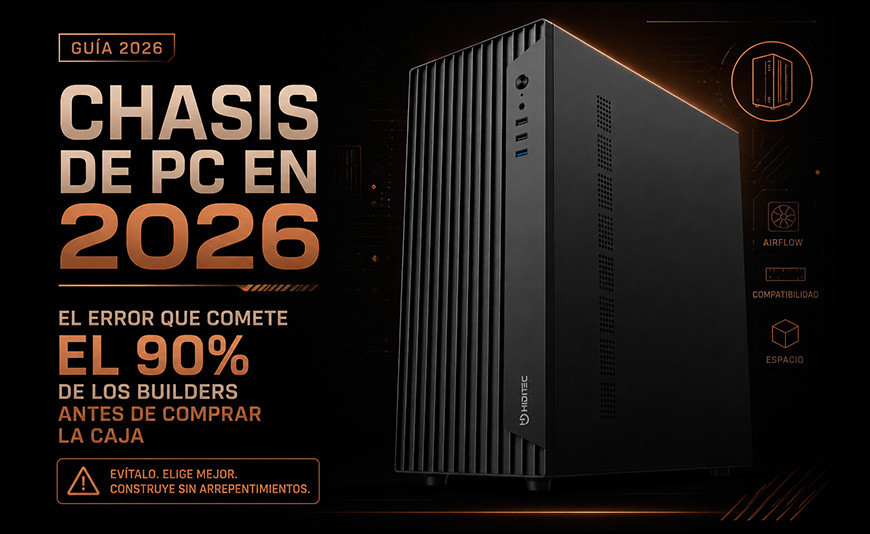
PC Cases in 2026: The Definitive Guide
to Choosing the Right Chassis Your Build Actually Needs
The case is the decision most people get backwards: they buy the chassis because they like how it looks, then discover the GPU doesn't fit, the cooler scrapes the side panel, or there's no room for the radiator. This guide teaches you to choose it the right way, with every criterion that matters and none that doesn't.
What You Need to Know Before Buying a Case
The motherboard form factor is law. Before looking at designs, confirm whether your board is ATX, Micro ATX, or Mini ITX. The chassis must support that form factor — everything else is irrelevant if it doesn't.
Measure the GPU before you buy. High-end graphics cards in 2026 exceed 320 mm. If the case only supports up to 290 mm, you have a problem with no elegant solution.
Cooling defines the chassis, not the other way around. If you're installing a 360 mm AIO, the case must support it. If you're using only an air cooler, you don't need as much interior space.
Airflow isn't aesthetic — it's functional. A case with good airflow can lower your system temperatures by 5 to 15 °C compared to a closed design. That difference shows up in both performance and longevity.
The PC chassis is the most overlooked component in hardware guides and the one that causes the most headaches during assembly. It has no clock speed, no throughput rating, no benchmark score. But it's the piece that determines which components you can install, how air flows through your system, and whether you'll be able to upgrade in two years without buying a new case.
In 2026, with GPUs exceeding 340 mm in length, dual-tower air coolers reaching 170 mm in height, and 360 mm liquid cooling systems that have become standard even in mid-range builds, choosing the right case matters more than ever. This guide explains everything you need to know to avoid making the wrong call.
1. Form Factors: The First Filter Nobody Can Skip
The case form factor determines what motherboard sizes it accepts. If you buy an ATX board and a Micro ATX case, the board won't fit physically. There's no workaround. It's the most expensive and most common mistake first-time builders make.
Simply put: Think of the case as a picture frame and the motherboard as the picture. A large frame fits smaller pictures, but a small frame can't hold a larger one. ATX cases accept ATX, Micro ATX, and Mini ITX boards. Micro ATX cases only accept Micro ATX and Mini ITX. Mini ITX cases only accept Mini ITX.
| Case Type | Compatible Boards | Interior Space | Typical User Profile |
|---|---|---|---|
| Full Tower | E-ATX, ATX, Micro ATX, Mini ITX | Very large, maximum expansion | Professional workstation, servers |
| Mid Tower (ATX) | ATX, Micro ATX, Mini ITX | Spacious, well-balanced | Gaming, content creation, general use |
| Mini Tower (Micro ATX) | Micro ATX, Mini ITX | Compact, GPU and cooling limitations | Office, HTPC, mid-range gaming |
| Mini ITX | Mini ITX only | Very small, severe restrictions | SFF gaming, living room PC, portability |
2. Maximum GPU Length: The Measurement Everyone Forgets
Graphics cards in 2026 are larger than ever. An RTX 5070 Ti in triple-fan AIB form can exceed 340 mm. An RTX 5090 from AIB partners reaches 360 mm. If your chosen case only supports GPUs up to 290 mm, there's nothing to be done: the card simply won't fit.
Simply put: Imagine the GPU is a sofa and the case interior is your living room door. If the sofa is 3 meters wide and the door is 2.5 meters wide, it won't go through — no matter how you angle it or how hard you try. Measure the GPU before buying the case, or conversely: check the maximum GPU length the case supports before choosing your card.
| GPU (2026) | Typical AIB Length | Case with 290 mm max. | BLOK Hiditec | SKY Hiditec (400 mm) |
|---|---|---|---|---|
| RTX 3060 12GB | 200 mm | Yes | Yes | Yes |
| RX 9070 XT | 267 mm | Yes | Yes | Yes |
| RTX 5070 (dual fan) | 280 to 300 mm | Tight | Yes | Yes |
| RTX 5070 Ti (triple fan) | 320 to 340 mm | No | Check AIB model | Yes |
| RTX 5090 (triple fan) | 360 mm or more | No | No | Yes |
3. Maximum CPU Cooler Height: The Detail That Keeps the Side Panel Shut
The CPU cooler is the tallest component inside the chassis. If its height exceeds the clearance left by the side panel, the panel won't close. You either force it and bend the aluminium, swap the cooler, or swap the case. Once everything is assembled, there's no elegant fix.
Simply put: It's like buying a Christmas tree without measuring the ceiling. If the tree is 2.3 m tall and your ceiling is 2.1 m, good intentions won't solve it. Always check the maximum CPU cooler clearance listed for the case and compare it against the cooler's specs before purchasing either one.
| Cooler | Height | TDP | BLOK (155 mm max.) | SKY (175 mm max.) |
|---|---|---|---|---|
| Intel/AMD stock cooler | 55 to 70 mm | 65 W | Yes | Yes |
| Hiditec C20 PRO | 158 mm | 265 W | No | Yes |
| Hiditec C40 PRO | 160 mm | 290 W | No | Yes |
| Noctua NH-D15 | 165 mm | 250 W | No | Yes |
| be quiet! Dark Rock Pro 5 | 162 mm | 250 W | No | Yes |
4. Airflow: Why Air Circulation Matters More Than Tempered Glass
Airflow inside the chassis is what keeps components at their optimal operating temperature. A system with good airflow can sustain stable performance for hours under peak load. A system with poor airflow hits temperatures that trigger thermal throttling, automatically reducing CPU and GPU output, and shortens the lifespan of your components.
Simply put: Think of the case interior like a room with a heater. If you only crack one small window, heat builds up. But if you open a large window at the front (cool air in) and another at the back (hot air out), you create a current that keeps the temperature under control. Front fans push cool air in. Rear and top fans expel the warm air. That's airflow.
Recommended Airflow Configuration by Case
Capacity: Up to 4 × 120 mm fans (1 rear included as standard)
Optimal config: 2 front intake + 1 rear exhaust + 1 top exhaust
Max radiator: 240 mm (front or top)
Ideal for: Mid-range builds with air cooler or 240 mm AIO. The smartest choice for price and functionality.
Capacity: Up to 7 × 120 mm fans
Optimal config: 3 front intake + 360 mm top radiator + 1 rear exhaust
Max radiator: 360 mm (front and top)
Ideal for: High-end builds with 360 mm AIO, large-format GPUs, and active overclocking.
5. Cable Management: The Detail That Separates a Professional Build from an Amateur One
A case with good cable management has strategic openings between the main tray and the rear compartment, velcro straps or anchors to route cables cleanly, and enough space in the rear chamber to stow them without pressing against the side panel. A case without cable management is a tangle of wires draped over components that blocks airflow, complicates maintenance, and turns every upgrade into a surgical operation.
| Cable Management Feature | Why It Matters | BLOK | SKY |
|---|---|---|---|
| Dual-chamber design (components + cables) | Cables don't occupy space in the component zone | Yes | Yes |
| Grommeted cable routing openings | Route cables cleanly without damaging them | Yes | Yes |
| Rear chamber depth over 25 mm | Lets the panel close cleanly with thick modular PSU cables | Yes | Yes |
| Velcro anchor points or zip tie mounts | Keeps cables secured so they don't vibrate or shift | Yes | Yes |
| Dedicated PSU compartment | Isolates PSU heat from the rest of the components | Yes | Yes |
6. Hiditec BLOK: The Case That Doesn't Overcharge You for Space or Features
The Hiditec BLOK is an ATX mid-tower designed for builders who want genuine functionality without paying for things they won't use. No RGB lighting inflating the price, no glass in positions that hurt airflow, no empty aesthetic excess. Just a well-executed case for a PC that will work reliably for years.
Hiditec BLOK: Real Specifications
COMPATIBILITY
Boards: ATX, Micro ATX, Mini ITX
PSU: Standard ATX
Max GPU: check your specific AIB model
COOLING
Fans: up to 4 × 120 mm
Included: 1 × 120 mm rear
Max CPU cooler height: 155 mm
STORAGE
2 × HDD 3.5" + 1 × SSD 2.5"
or 1 × HDD + 2 × SSD
Configurable to your needs
FRONT I/O
1 × USB 3.0
2 × USB 2.0
HD audio in and out
What the BLOK Is Perfect For
- Mid-range builds with a Ryzen 5 or Core i5 and an RTX 3060 or RX 7600
- Office PCs or compact workstations
- Your first self-built PC without overspending on the case
- Professional environments where a discreet aesthetic is a requirement
- Builds with a single-tower air cooler up to 120 W TDP
When You Should Choose a Different Case
- GPU longer than 300 mm (check your specific AIB model)
- Dual-tower air cooler taller than 155 mm
- 360 mm AIO (requires a case with larger radiator support)
- Builds with aggressive overclocking that need more ventilation capacity
- If you want a tempered glass side panel to show off a lit interior
7. Hiditec SKY: For Builds That Don't Accept Compromises
The Hiditec SKY is the answer for builds that need real space: large-format GPUs, 360 mm AIOs, dual-tower coolers, and support for up to seven 120 mm fans. Triple tempered glass panels (front, side, and top) let you see the full interior without sacrificing airflow, thanks to its high-volume ventilation system.
| Specification | BLOK | SKY |
|---|---|---|
| Form Factor | ATX Mid Tower | ATX Gaming Mid Tower |
| Compatible Boards | ATX, Micro ATX, Mini ITX | ATX, Micro ATX, Mini ITX |
| Max GPU | Check AIB model | 400 mm |
| Max CPU Cooler Height | 155 mm | 175 mm |
| Max Fans | 4 × 120 mm | 7 × 120 mm |
| Max Radiator | 240 mm | 360 mm |
| Side Panel | Steel | Tempered glass |
| Front Panel | ABS with mesh grille | Tempered glass with side ventilation |
| Ideal Build Profile | Mid-range, office, first PC | High-end, 4K gaming, active OC |
8. How to Choose Your Case in 2026: The Correct Process, Step by Step
This is the right order for choosing your case without making compatibility mistakes:
Step 1: Confirm your motherboard's form factor
ATX (30.5 × 24.4 cm), Micro ATX (24.4 × 24.4 cm), or Mini ITX (17 × 17 cm). You'll find this in the board's specs or on the box.
Step 2: Note the exact length of your GPU
Find it in the specs for the specific AIB model you're buying, not the reference card. The same GPU chip can vary by 10 to 40 mm depending on the board partner's cooler design.
Step 3: Decide your CPU cooling solution
Air cooler: check its height. AIO: check the radiator size (120, 240, or 360 mm) and whether the case supports it in the position you need.
Step 4: Now choose the case
With those three data points confirmed, filter for cases that support your form factor, GPU length, and cooling solution. What remains after that filter is your real shortlist. Within that shortlist, choose by design, price, and extras.
Step 5: Check the power supply
All modern mid-tower cases support standard ATX PSUs. But if you choose a Mini ITX or compact case, the PSU may need to be SFX or SFX-L format. Verify this before purchasing. You can browse compatible options in the Hiditec power supply range.
Frequently Asked Questions About PC Cases
Everything you need to know to avoid getting your case choice wrong in 2026
Can I put a Micro ATX board in an ATX case?
Yes, no problem at all. ATX cases like the Hiditec BLOK or the SKY always accept smaller boards because the mounting holes for smaller form factors are included in the motherboard tray. The only result is some empty space at the bottom of the case, which is completely normal and has no meaningful impact on performance or airflow. What never works is the reverse: an ATX board will not fit in a Micro ATX case.
What happens if my CPU cooler is too tall for my case?
The side panel won't close. And there's no elegant fix: you either swap the cooler for a shorter one, or swap the case. Never force the side panel closed when the cooler protrudes — you risk bending the panel, damaging the cooler fans, or destabilising the socket mounting. Prevention is simple: check the CPU cooler clearance spec of the case (found under compatibility or "CPU Cooler Clearance") and compare it to the cooler's dimensions before buying either one. With the BLOK (155 mm limit), the ideal choice is a single-tower cooler up to 155 mm. With the SKY (175 mm clearance), even the largest dual-tower coolers on the market fit with room to spare.
Do I need a modular PSU for good cable management inside the case?
Not strictly required, but it makes a significant difference in the final result. A modular or semi-modular PSU lets you connect only the cables you actually need, eliminating the excess that, with a non-modular unit, you'd have to hide somewhere in the rear chamber. If the case has good cable management features and enough rear chamber depth, even a non-modular PSU can result in a tidy build. But if you want the cleanest possible result, a modular unit is the right call. You can explore the differences in detail in our guide Modular vs. Non-Modular PSUs: Marketing or Real Need?
Is a case with a tempered glass front panel worth it?
From a thermal performance standpoint, a tempered glass front is worse than a metal mesh front because it restricts incoming airflow. The difference can be 3 to 8 °C across components under peak load, depending on the configuration. If aesthetics come first and you won't be pushing components to their thermal limits, a glass front is perfectly valid. If you're running an actively overclocked system, a GPU over 300 W, or a CPU over 150 W, prioritise a mesh front. The BLOK handles this with an ABS front panel with a mesh grille that delivers strong intake airflow without giving up a clean, professional look.
How many fans does my case need?
The minimum effective configuration is one front intake and one rear exhaust. That gives you a basic airflow loop that improves temperatures versus running none at all. The optimal setup for most gaming builds is two or three front intakes and one rear exhaust, creating a slight positive pressure that keeps dust out and moves heat toward the exit. For overclocked builds or high-TDP GPUs, adding top exhaust fans noticeably improves CPU and VRM temperatures. Beyond four 120 mm fans in a standard mid-tower, returns diminish and noise increases without proportional thermal gain.
What's the difference between a gaming case and an office case?
Essentially, design and extras. A gaming case typically includes tempered glass to show off the interior, RGB or ARGB lighting, more fan mounting positions, and greater cooling capacity. An office case like the Hiditec BLOK prioritises a neutral, professional finish, no lighting to distract in work environments, and a robust, understated design. In terms of physical compatibility, both types accept the same components if they share the same form factor. The choice comes down to where the PC will live: a desk in a professional or corporate setting benefits from the discretion of an RGB-free case; a home setup allows more visual expression if that's the goal.
Sources:
- Hiditec BLOK: official technical specifications
- Hiditec SKY: official technical specifications
- Hiditec C40 PRO: technical specifications
- Hiditec C20 PRO: technical specifications
- Hiditec Blog: Are Your Components Compatible? Complete PC Compatibility Guide 2026
- Hiditec Blog: How to Install 360 mm Liquid Cooling in the SKY Case
- Hiditec Blog: Best Power Supplies 2026 Guide
- Amazon Spain: Hiditec BLOK (verified product page)



Leave a Reply Cancel Reply