
 Español
  Português PT
BTF Motherboards and Reverse Connectors: Complete 2026 Guide
- 22 Jul, 2026
- Home , News
- 1 Comments
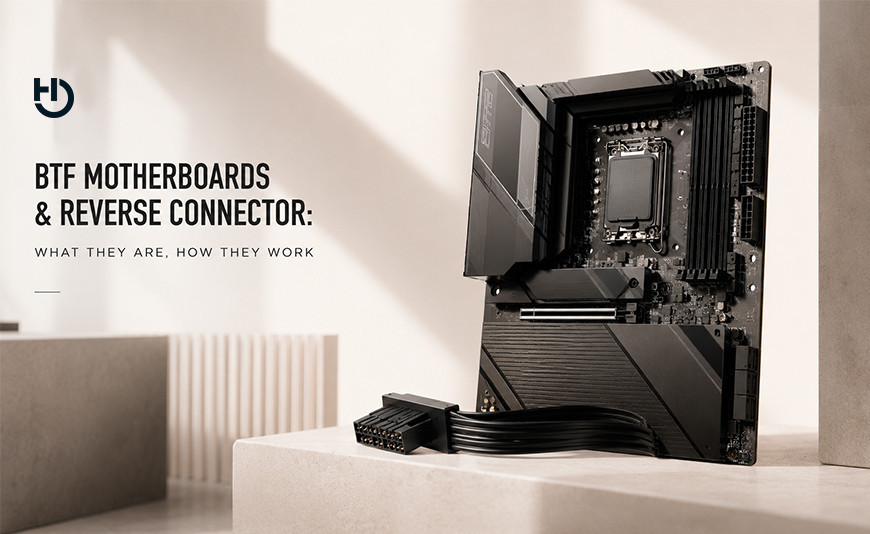
BTF motherboards and reverse connectors: what they are, how they work
and why the Hiditec H3 PRO is the case that makes the most of them
You've spent years building PCs with a tangle of cables obscuring the motherboard, blocking airflow, and ruining the aesthetics of an otherwise flawless setup. BTF reverse connector motherboards solve exactly that problem. This guide explains from scratch what they are, which models exist, how to install them, and what your case needs to make the most of them—with the Hiditec H3 PRO as the answer to that last question.
The essentials if you don't have time to read everything
What is BTF / reverse connector? A motherboard where all power and data connectors are on the back side—the one that sits against the case tray—instead of on the visible front. The result: your motherboard looks completely clean from the front, not a single cable in sight.
Do I need a special case? Yes. The case needs slots in the motherboard tray aligned with those rear connectors. Without them, the cables have nowhere to go. The Hiditec H3 PRO includes this design as standard.
Which brands make BTF motherboards? Three main families: ASUS BTF, MSI Project Zero, and GIGABYTE AORUS Stealth. Each has its own connector positioning standard, but the H3 PRO is compatible with all three.
Is it complicated to build with BTF? Actually, it's easier than traditional assembly. Cables run behind the tray, the front space stays clear, and the final result is an interior that looks like a catalog photo even if you're not a cable management expert.
If you've been watching builds on YouTube or social media and wondering how the inside of some cases is so clean—without the classic cable mess blocking the motherboard, without the 24-pin ATX connector running across the entire panel—the answer is almost always the same: they're using a reverse connector motherboard.
The technology has been maturing for a couple of years and in 2025 it's reached the mid-range market. It's no longer a luxury for €500 motherboards: you can build a BTF PC for less than a high-end traditional board costs. What you need is to know what to look for, what's compatible with what, and which case to pick so everything fits. That's exactly what we're going to explain here.
1. What is a reverse connector motherboard? The problem it solves
To understand what a BTF motherboard does, you first need to understand what a standard one does. In a standard motherboard, all power and data connectors are on the front side—the one you see when you open the case. The 24-pin ATX connector (the big one, the main power) runs from the PSU, crosses the entire interior of the case, and plugs into the right side of the motherboard. The 8-pin EPS connector for the CPU runs up to the upper left corner. SATA, USB, and fan connectors dot the entire visible surface. The result is a maze of cables you have to tame, hide, and zip-tie if you want the interior to look presentable.
The solution with BTF motherboards is so obvious in hindsight that it's surprising it took so long to arrive: move all those connectors to the back side of the motherboard. The side that sits against the case tray. The side nobody sees. The cables still exist—the PSU still delivers power to the motherboard—but instead of crossing the visible interior, they exit behind the tray directly toward the case's rear chamber.
Standard motherboard vs. BTF motherboard: what exactly changes
Standard motherboard
24-pin ATX connector on the right side of the motherboard, visible from the front. 8-pin EPS connector in the upper left corner. SATA, USB, and fan headers on the front side. Cable management is manual, laborious, and results vary depending on the builder's skill level.
BTF / reverse connector motherboard ✅
All power and data connectors on the back side of the motherboard. The visible interior stays completely clear from the moment you start building. Better airflow by eliminating cables as an obstruction. Building is faster and cleaner, even for beginners.
There's an important detail to clarify: rear connectors aren't just aesthetic. By removing cables from the front space, airflow between the front fans, the CPU cooler, and GPU improves measurably. There are no physical obstructions interrupting the flow of cool air to the components. It's a real thermal advantage, not just a design consideration.
And there's another benefit that gets mentioned less: building becomes more accessible for beginners. With a standard motherboard, running the 24-pin cable behind the tray, tensioning it without pressuring the board, and keeping it straight without poking through gaps is an art that takes practice. With BTF, that cable goes directly to the rear connector without crossing anything. The mistake of "I forgot to connect the power and now I have to disassemble half the PC" becomes much easier to avoid.
2. The three BTF families: ASUS, MSI, and GIGABYTE
There's no universal reverse connector standard. Each manufacturer developed its own system with slightly different connector positions. This matters because your case needs to have slots in the correct position for your motherboard. The good news is that the Hiditec H3 PRO is compatible with all three major ecosystems.
| Ecosystem | Brand Name | Available Sockets | Standout Models 2025 |
|---|---|---|---|
| ASUS | BTF (Back To Future) | AM5 · LGA1700 · LGA1851 | TUF B850-BTF WIFI, ROG Crosshair X870E Hero BTF, ROG Maximus Z890 Hero BTF |
| MSI | Project Zero | AM5 · LGA1700 | MAG X870E Tomahawk Max WIFI PZ, B650M Project Zero, Z790 Project Zero |
| GIGABYTE | AORUS Stealth | AM5 (ATX and Micro-ATX) | B850 AORUS Stealth (ATX), B850M AORUS Stealth (Micro-ATX), X870 AORUS Stealth ICE (ATX) |
ASUS BTF is the most complete ecosystem with the most models available in 2025. The lineup ranges from mid-range boards like the TUF B850-BTF to high-end ROG models, all with AM5. ASUS has also introduced the Advanced BTF standard, which adds a high-power PCIe connector in the GPU slot capable of delivering up to 600 W directly from the motherboard, eliminating the GPU power cable from the equation. You'll need a compatible BTF graphics card for this to work, but the direction the standard is heading is clear.
MSI Project Zero was one of the pioneers of the format and has a good selection of boards for both AM5 and Intel LGA1700. The MAG X870E Tomahawk Max WIFI PZ is especially interesting for Ryzen 7000/9000 users looking for a solid mid-to-high-range board without giving up rear connectors.
GIGABYTE AORUS Stealth completes the trio with competitive offerings in price and performance. The ecosystem has two standout AM5 models in 2025: the B850 AORUS Stealth in ATX format (with 14+2+2 phases, 4x M.2, and PCIe 5.0) and the B850M AORUS Stealth in Micro-ATX for more compact builds. For high-end, the X870 AORUS Stealth ICE is the reference with USB4, 5GbE, and Wi-Fi 7.
3. How to build with a BTF motherboard: step by step
Building with a BTF motherboard follows the exact same steps as any other PC, with one fundamental difference in how you connect the power. Here's the complete process for someone doing this for the first time with a case like the H3 PRO.
BTF assembly in the Hiditec H3 PRO: the right order
Prepare the motherboard outside the case
Install the CPU, RAM modules, and CPU cooler before putting the motherboard in the case. It's much more comfortable doing it on a flat surface. With BTF, the process is identical to traditional builds at this stage.
Run PSU cables behind the tray BEFORE installing the motherboard
This is the key difference. With a BTF build, the power cables (24-pin ATX, 8-pin CPU EPS, SATA, etc.) go first through the specific slots in the H3 PRO's tray and wait on the rear side. The tray has openings positioned exactly for each connector.
Install the motherboard on the tray
Place the motherboard on the standoffs, align the rear connectors with the corresponding tray openings, and screw it down. The motherboard connectors are now perfectly aligned with the slots the cables will exit through.
Connect all cables from the rear side
From the H3 PRO's rear chamber, plug in the 24-pin ATX, CPU EPS, and other connectors directly into their ports on the motherboard's back. The space behind the tray is designed to comfortably house all these cables without strain.
Install GPU, SSDs, and close the case
The front interior is now completely cable-free. Install your graphics card in the PCIe slot, M.2 SSDs in their slots, and any other components. The final result is an interior that looks catalog-ready without spending hours on cable management.
4. The Hiditec H3 PRO: the case that doesn't limit your BTF motherboard
Having a BTF motherboard is only half the equation. Your case needs to be designed for that ecosystem: if the tray doesn't have slots in the exact position of your motherboard's rear connectors, the system doesn't work. And if the case has the slots but a tiny rear chamber, cables have nowhere to go.
The Hiditec H3 PRO was designed specifically with this in mind. The tray has openings in the correct positions for all three major standards—ASUS BTF, MSI Project Zero, and GIGABYTE Stealth—and the space behind the tray is designed so rear cable management is comfortable, not an origami puzzle.
Hiditec H3 PRO: complete specifications
Available in black and white. Compatible with ATX, Micro ATX, and ITX.
? BTF COMPATIBILITY
Compatible with ATX reverse connector motherboards: ASUS BTF, MSI Project Zero, and GIGABYTE AORUS Stealth. The tray has slots positioned for all three standards.
❄️ COOLING
Supports up to 10 x 120mm fans (or combination with 140mm). Support for 360mm, 280mm, and 240mm radiators on both top and side. 120mm ARGB fan included as standard.
? COMPONENT SPACE
GPU up to 400mm in length. CPU cooler up to 165mm in height. 8 PCI slots. 1 x 3.5" and 2 x 2.5" drive bays for additional storage.
?️ PANEL AND CONNECTIVITY
Front and side tempered glass panels (4mm) with tool-free opening. Front I/O with USB 3.2 Type-C, USB 3.0, USB 2.0, and audio in/out. ARGB controller with remote control included.
One detail that makes a real difference day-to-day is the tool-free side panel. On traditional cases, every time you need interior access you have to find a screwdriver and store the screws somewhere safe so you don't lose them. On the H3 PRO, the 4mm glass opens and closes with a tool-free latch mechanism—something that seems minor until you've built your second or third PC and realize you're not hunting for a Phillips head across your room.
The included ARGB controller with remote also deserves mention. You can connect all your ARGB fans to the case's internal hub and sync them without needing an RGB header on the motherboard or extra software—the remote controls lighting directly. For builds with many fans, this massively simplifies RGB cabling.
5. Recommended builds: the H3 PRO with BTF motherboards in 2025
For concrete reference on which combinations make sense, here are three build profiles with the H3 PRO and BTF motherboards based on budget and use case.
AMD Ryzen 7 9800X3D + ASUS TUF B850-BTF WIFI + Hiditec H3 PRO + Hiditec DC40 PRO
The most balanced combination for a high-performance gaming PC with a flawless interior. The TUF B850-BTF is the go-to mid-range BTF board for AM5 in 2025: compatible with Ryzen 9000, PCIe 5.0, Wi-Fi 7, and rear connectors. The dual-tower DC40 PRO fits perfectly within the H3 PRO's 165mm clearance and keeps the 9800X3D cool. The result is a build with a completely cable-free tempered glass front panel.
AMD Ryzen 9 9950X + MSI MAG X870E Tomahawk Max WIFI PZ + Hiditec H3 PRO
For those who need a PC that handles everything: gaming, rendering, video editing, and compilation. The Tomahawk Max PZ is the Project Zero version of the best-selling AM5 board this year, with plenty of VRM headroom and all the benefits of rear connectors. The H3 PRO has room for a 360mm AIO on top if you want liquid cooling for the 9950X.
Intel Core Ultra 9 285K (LGA1851) + ASUS ROG Maximus Z890 Hero BTF + Hiditec H3 PRO White
For builds where aesthetics matter as much as performance. The white H3 PRO with tempered glass on front and side, paired with the ROG Maximus Z890 Hero BTF (LGA1851 socket for Intel Core Ultra Series 2 processors) and white components, creates a completely clean setup that holds up to close camera angles. ASUS's Advanced BTF even lets you eliminate the GPU cable if you use a BTF graphics card.
6. Is BTF for you? Questions to help you decide
| Situation | Is BTF worth it? |
|---|---|
| Case with tempered glass, want visible and clean interior | Yes, BTF is ideal here |
| Your first PC and cable management seems intimidating | Yes, BTF simplifies building |
| Opaque case with no side window, only care about performance | Not priority, but improved airflow is still a real advantage |
| Already own a case without BTF slots and don't want to change it | No, case is the limiting factor |
| Frequently upgrade or rebuild your PC | Yes, rear cables make it faster |
Frequently asked questions about BTF and the Hiditec H3 PRO
Common questions answered with real data
Can I use a BTF motherboard in a standard case?
Technically yes—the board works fine. But the rear connectors become inaccessible without the specific slots, meaning you'd have to connect everything from the front using alternate connectors some BTF boards keep for compatibility. You'd lose all the aesthetic and building advantages. To truly benefit from BTF, you need a case designed for it like the H3 PRO.
Are BTF connectors more fragile being on the rear?
No. The connectors are the same type and quality as any standard motherboard. In fact, being on the rear where there's less traffic and it's accessed less frequently, they're in a more protected environment than traditional front connectors, which are exposed every time you open the case.
Is the H3 PRO compatible with all BTF boards or just some?
The H3 PRO is compatible with the three major standards: ASUS BTF, MSI Project Zero, and GIGABYTE AORUS Stealth. The tray has openings positioned for each. You do need to watch the form factor: the H3 PRO accepts ATX, Micro ATX, and ITX. Some high-end BTF boards come in E-ATX format, which isn't compatible.
What is Advanced BTF and do I need a special GPU?
Advanced BTF is an additional ASUS standard that adds a high-power connector in the motherboard's PCIe slot capable of delivering up to 600 W directly to your GPU from the board, eliminating the graphics card's power cable from the equation. To take advantage of it you need a BTF board with that connector and an ASUS BTF graphics card. It's the evolution of the format, but the compatible GPU ecosystem is still growing.
Do I need a special power supply for BTF?
No. Any standard ATX power supply works with BTF motherboards. The cables are exactly the same—what changes is their routing inside the case, not the connector type. That said, if you use a modular or semi-modular PSU, you'll have an easier time managing cable length in the rear chamber and avoiding bulky cable runs.
Information sourced from:
- Hiditec: H3 PRO official technical specifications and BTF compatibility
- ASUS: TUF Gaming B850-BTF WIFI W specifications and hidden connector design
- MSI: Project Zero official ecosystem page for reverse connectors
- ArmaPCGamer: Cable-free PCs 2025 comparison of ASUS BTF vs MSI Project Zero vs AORUS Stealth
- Corsair: How we're adapting our cases to reverse connector motherboards
- HardwarePremium: ASUS BTF at CES 2025 new models and Advanced BTF standard
- PcComponentes: ASUS TUF Gaming B850-BTF WIFI W reviews and current price


This cleared up a lot for me. I\'ve built a few PCs and the cable mess always drove me crazy. Didn\'t realize ASUS, MSI, and Gigabyte each made their own version of BTF, wish I\'d known that before buying my board from Orange Hardwares. Might try the H3 PRO next time since it fits all three. Thanks for the simple explanation.