
 Español
  Português PT
ATX 3.1, Japanese Capacitors and OVP Protection: Everything Nobody Tells You About Your PC Power Supply
- 31 Jul, 2026
- Home , News
- 0 Comments
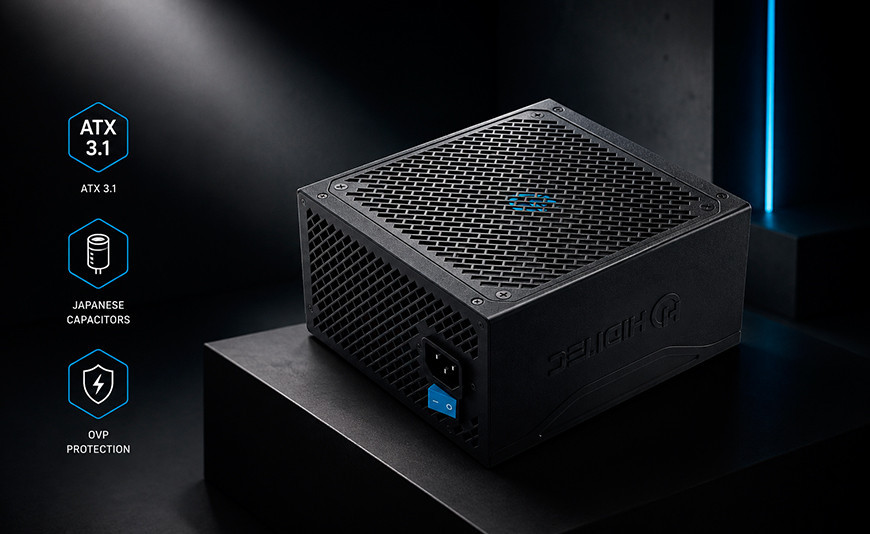
ATX 3.1, native cables for NVIDIA, Japanese capacitors and OVP protection:
everything nobody explains about your PC's power supply — and that can destroy everything else if you get it wrong
The power supply is the least glamorous component in a PC — and the only one capable of taking everything else down with it when it fails. In 2026, with the ATX 3.1 standard now in full effect, new NVIDIA and AMD GPUs demanding over 600 W in peak spikes, and ongoing component price pressure, choosing the right PSU matters more than ever. This guide covers everything: from what ATX 3.1 actually is, to why Japanese capacitors aren't just marketing, to the efficiency myths everyone repeats without understanding.
This guide at a glance
ATX 3.1 is not marketing. The new standard requires PSUs to handle current spikes of up to 200% of their rated wattage for 100 microseconds. With the RTX 5090 and RX 9070 XT firing momentary draws of 600–900 W, this is what prevents your PC from shutting down mid-game.
The native cable matters more than the wattage. A PSU with a native PCIe 5.1 cable eliminates the risk posed by 4×8-pin adapters that caused fires in RTX 40 graphics cards. No adapter means no added resistance, no hot spots.
80 PLUS Gold does not automatically mean better than Bronze. The efficiency rating measures how much energy becomes heat instead of usable power. But a cheap Gold PSU can have worse capacitors, weaker protections, and poorer voltage regulation than a quality Bronze unit. The certificate is only one piece of the picture.
Japanese capacitors are not a sales pitch. They determine how many years the PSU lasts, how cleanly it delivers current under load, and whether the voltage reaching your CPU and GPU is stable or riddled with electrical noise. The difference between a PSU that lasts 10 years and one that fails in 3 comes down to capacitor quality.
The power supply is the component that gets the least attention when building a PC. Budgets flow toward the GPU, CPU, and monitor, and the PSU gets picked almost as an afterthought based on wattage and price. That is a mistake that can cost real money: a poor PSU does not just waste electricity — it delivers dirty current to your components, degrades faster, and when it eventually fails, it can take everything connected to it down in a chain reaction.
In 2026, the topic carries an additional layer of complexity: the ATX standard has changed, GPU connectors have changed, and the power spikes of next-gen graphics cards are more extreme than ever. This guide explains everything you need to know, from the absolute basics to the technical details that only the most experienced builders tend to understand.
1. ATX 3.0 vs ATX 3.1: what changed and why it matters for your GPU
The ATX standard has been defining how PC power supplies should be built for decades. For years, revisions were minor: small tolerance adjustments, tweaks to secondary connectors. ATX 3.0, launched in 2022, marked the first deep overhaul in a long time. ATX 3.1, published in 2023 and adopted widely across 2025–2026, refines it further with meaningful improvements.
In plain terms: previously, PSUs only needed to deliver their rated wattage steadily. With modern GPUs, that is no longer enough. An RTX 5090 might average 450 W, but in the first frame of an explosion in Cyberpunk 2077 it can spike to 900 W for 100 microseconds. If the PSU cannot absorb that spike, the system interprets it as an overcurrent event and cuts power. The result: a black screen mid-session, and in worst-case scenarios, damage to the card itself.
| Feature | ATX 2.x (legacy) | ATX 3.0 | ATX 3.1 (current) |
|---|---|---|---|
| Peak tolerance (12V rail) | ±5% continuous | 150% for 100 µs | 200% for 100 µs |
| Native GPU connector | 6-pin / 8-pin | PCIe 5.0 (16-pin / 600 W) | PCIe 5.1 (16-pin / 600 W improved) |
| 12V voltage regulation | ±5% | ±3% | ±3% (maintained and verified) |
| Low-load efficiency (10%) | No requirement | ≥70% | ≥70% (stricter measurement) |
| Standby signal (5VSB) | No improvement | Improved | Optimised for faster boot |
2. The PCIe 5.1 connector and native cables: why the 4×8-pin adapter was a mistake
When NVIDIA launched the RTX 40 series in 2022, it introduced a new 16-pin connector called 12VHPWR (or PCIe 5.0) capable of delivering up to 600 W through a single cable. The problem: most PSUs of that era used 8-pin connectors, so NVIDIA bundled 4×8-pin to 16-pin adapters with the cards. Those adapters caused fires.
Subsequent investigation concluded that the connector itself was not at fault — the problem was how users bent and stressed the cable at the adapter. Bending the cable within 35 mm of the connector increased electrical resistance at that point, which generated heat and, in extreme cases, melted the plastic housing and ignited. It was not a design flaw in the PCIe 5.0 connector itself: it was a flaw in the adapter and how it was being installed.
The fix that came with ATX 3.1: the PCIe 5.1 specification improved the connector design with a more secure retention mechanism, and — more importantly — quality ATX 3.1 PSUs now include the PCIe 5.1 cable natively, with no adapter. That removes the adapter failure point entirely and guarantees that every conductor in the cable is sized for the current it needs to carry, from the PSU to the GPU, without interruption.
Native PCIe 5.1 cable vs adapter: the practical difference
Native cable (recommended) ✅
Exits the PSU already as a 16-pin connector. Every conductor is rated for the load from the source to the GPU, with no intermediate joints. No hot spots, no added resistance, no risk of a bad connection at an adapter junction.
4×8-pin adapter (risk) ⚠️
Joins four 8-pin cables into a single 16-pin connector. Each junction adds resistance. If the cable is bent within 35 mm of the connector, that resistance rises, generates heat, and can melt the housing. This was the documented cause of fires in RTX 40 cards throughout 2022–2023.
What to look for on the box
Look for the words "PCIe 5.1 native", "12V-2x6 native" or "ATX 3.1". If the PSU says "adapter included" rather than "native cable", it is a previous-generation unit being repackaged. It is not the same thing.
3. Japanese capacitors: what they actually determine (and why it is not marketing)
"Japanese capacitors" appears in almost every quality PSU description, and many buyers read it as empty marketing. It is not. Capacitors are the components that most influence a PSU's lifespan, the quality of the current it delivers, and how it behaves as it ages. And the difference between Japanese capacitors and cheaper alternatives is measurable and well-documented.
What an electrolytic capacitor does in a PSU: think of it as a small energy reservoir inside the unit. When mains power enters the PSU, it does not arrive perfectly stable — it comes as a wave (alternating current). Capacitors smooth those waves, converting AC into clean, stable DC that reaches your CPU, GPU, and motherboard. If the capacitors are low quality, the current they deliver carries "noise" — small fluctuations — that accelerates component wear over time.
| Characteristic | Japanese capacitors (Nichicon, Rubycon, Nippon Chemi-Con) | Generic capacitors |
|---|---|---|
| Rated lifespan at 85 °C | 5,000 – 10,000 hours | 1,000 – 2,000 hours |
| Maximum operating temperature | 105 °C | 85 °C |
| Ripple (noise on the current) | Very low — clean current | Higher ripple — current with fluctuations |
| Degradation over time | Gradual and predictable | More abrupt and unpredictable |
| Impact on components | Stable voltage, minimal wear | Noisy voltage, accelerated wear |
4. OVP, OCP, OPP, SCP and UVP protections: what each one does and when it activates
The protection acronyms in a PSU's spec sheet are among the most overlooked — and most important — things to check. These are the safety systems that prevent a PSU fault, or a mains spike, from becoming catastrophic damage to your motherboard, CPU, or GPU. Here is what each one means and when it actually kicks in during real-world situations.
PSU protections explained with real-world examples
OVP — Over Voltage Protection
What it does: cuts power if the voltage on any rail (12V, 5V, 3.3V) exceeds a safe threshold. When it activates: when an internal PSU fault causes it to deliver more voltage than intended, or when a mains spike passes through the PSU's filters. Real-world example: if the 12V rail starts delivering 13.5 V instead of 12 V, OVP cuts everything before that excess voltage reaches and damages the transistors in your GPU or your motherboard's memory modules.
OCP — Over Current Protection
What it does: limits the maximum current that can flow from each power rail. When it activates: when a component develops a partial short or fault that causes it to draw more current than it should. Real-world example: if the GPU develops a fault in its power circuit and starts pulling 50 A from the 12V rail when it should draw 35 A at most, OCP shuts off that rail before the excess current burns the GPU's inductors or the power cables themselves.
OPP — Over Power Protection
What it does: shuts down the PSU if the total power demand exceeds its safe maximum output in a sustained way. When it activates: when the whole system tries to draw more watts than the PSU can safely deliver. Real-world example: you have a 650 W PSU and have added components that demand 700 W under full load. OPP shuts the system down before the PSU overheats trying to deliver more than it can — which would degrade it rapidly or risk a fire.
SCP — Short Circuit Protection
What it does: detects a short circuit on any rail and cuts power within microseconds. When it activates: if a screw falls onto the motherboard and causes a short, or if any connected component develops an electrical fault. Real-world example: you install a new GPU and accidentally leave a piece of foil between the card and the PCIe slot. The moment you power on and the short forms, SCP cuts power before it can destroy the components. Without SCP, the result can be a dead motherboard, dead GPU, or both.
UVP — Under Voltage Protection
What it does: shuts the system down if the voltage on any rail drops below a safe minimum. When it activates: when the PSU is overloaded and cannot maintain nominal voltage, or when there is a sag on the mains supply. Real-world example: in summer, with the PC under full load and the air conditioning running, the mains voltage dips momentarily. If the 12V rail falls to 10.5 V, UVP performs a controlled shutdown instead of letting your components run on insufficient voltage — which can cause data corruption, crashes, and accelerated degradation.
OTP — Over Temperature Protection
What it does: shuts down the PSU if its internal components exceed a safe temperature limit. When it activates: if the PSU fan fails, if the case has inadequate ventilation, or if the PSU is being pushed beyond its sustained capacity. Real-world example: you are six hours into an intense gaming session in summer with the room at 30 °C. The PSU, which also has dust built up in the fan, begins to overheat. OTP shuts it down safely before that heat damages the capacitors and other internals — and gives you a clear signal that it is time to clean the unit.
5. The efficiency myths: what 80 PLUS Bronze, Gold and Platinum actually mean (and what they do not)
The 80 PLUS certification is one of the most misunderstood specs in PSU buying. Most buyers assume Gold is simply "better" than Bronze, and that Bronze is "bad". Neither statement is correct. The certificate measures exactly one thing: the percentage of energy drawn from the wall that is converted into useful power for the PC. The rest is wasted as heat.
What the certificate does NOT measure: capacitor quality, robustness of the protection systems, voltage regulation under variable loads, fan noise, component lifespan, cable quality, or whether the PSU can handle current spikes. A Gold PSU with generic capacitors and no OCP can be worse for your components than a Bronze PSU with Japanese capacitors and a full set of active protections.
| Rating | Efficiency at 20% load | Efficiency at 50% load | Efficiency at 100% load | Annual savings vs Bronze (750 W, 8 h/day) |
|---|---|---|---|---|
| 80 PLUS Bronze | 81% | 85% | 81% | Reference |
| 80 PLUS Silver | 85% | 88% | 85% | ~€3–5 / year |
| 80 PLUS Gold | 87% | 90% | 87% | ~€6–10 / year |
| 80 PLUS Platinum | 90% | 92% | 89% | ~€10–15 / year |
| 80 PLUS Titanium | 92% | 94% | 90% | ~€15–22 / year |
6. How many watts does your PC actually need: a build-by-build guide with real numbers
The most common question on any hardware forum: "how many watts do I need?" The correct answer depends on the specific components, but there is a practical guide based on measured real-world consumption that covers most scenarios. The general rule is to size your PSU so the system runs at 50–70% of rated capacity under typical load — keeping it in its most efficient range while leaving headroom for spikes.
| Build type | Example components | Gaming draw | Peak spike | Recommended PSU |
|---|---|---|---|---|
| Office / multimedia | Ryzen 5 5600 + GTX 1660 Super + 16 GB DDR4 | ~180 W | ~240 W | 450–550 W |
| Mid-range 1080p gaming | Ryzen 5 7600X + RTX 4060 Ti + 32 GB DDR5 | ~280 W | ~380 W | 650 W |
| High-end 1440p gaming | Ryzen 7 9800X3D + RTX 5070 Ti + 32 GB DDR5 | ~380 W | ~520 W | 750 W ATX 3.1 |
| 4K enthusiast gaming | Core Ultra 9 285K + RTX 5090 + 64 GB DDR5 | ~520 W | ~900 W (GPU spike) | 1000–1200 W ATX 3.1 |
| Workstation / editing + gaming | Threadripper + RTX 5080 + 128 GB DDR5 + multiple SSDs | ~600 W | ~850 W | 1000 W ATX 3.1 |
Hiditec BZ PRO: everything this guide asks for, in a single PSU
105 °C Japanese capacitors
Nichicon and Rubycon capacitors on the main circuits. A real-world service life of 8–10 years under normal use conditions, delivering clean, stable current to your CPU, GPU, and motherboard.
Full protection suite
OVP, OCP, OPP, SCP, UVP and OTP — all active. The complete set of protections this guide describes, in a unit built to protect your build across multiple hardware generations.
80 PLUS Bronze with quality internals
Exactly the case this guide makes: you do not need Gold to have an excellent PSU. The BZ PRO prioritises internal quality over the efficiency certificate — which, as we have seen, only measures efficiency, not reliability or protections.
7. The PSU and your RAM: how current quality affects real gaming performance
This is the least-known section and one of the most important for understanding why the power supply affects overall system performance beyond simply "delivering watts". RAM is extraordinarily sensitive to voltage stability. DDR5 modules operate at a nominal 1.1 V, with very tight tolerance margins. If the PSU has high ripple — noise on its output voltage — that noise reaches the motherboard, which partially amplifies it before distributing it to the memory modules.
What that looks like in a game: in Cyberpunk 2077 or Microsoft Flight Simulator 2024 — both titles that keep RAM at 80–90% utilisation with textures at ultra quality — a PSU with high ripple can cause memory read errors that the system interprets as slowdowns, micro-stutters, or, in serious cases, blue screens with memory error codes. These are errors that most users blame on the RAM or the game itself, when the real cause is the quality of the current reaching the modules.
| In-game symptom | Commonly blamed cause | Possible real cause |
|---|---|---|
| Random micro-stutters in Cyberpunk 2077 | Game bug / GPU drivers | PSU ripple affecting the RAM |
| Blue screens with memory error codes | Faulty RAM module | Unstable voltage from the PSU |
| PC restarts under full load in Warzone | CPU overheating | OPP triggering because the PSU has no headroom |
| XMP/EXPO won't stabilise in BIOS | Incompatible RAM modules | PSU with poor regulation on the 3.3V rail |
| Visual artefacts in Forza Horizon 5 | Defective GPU / corrupt driver | 12V rail ripple affecting VRAM |
Frequently asked questions about power supplies in 2026
Everything you need to know before choosing the PSU for your next build
Do I need an ATX 3.1 PSU if I have an RTX 5070 or RTX 5080?
It is highly recommended. The RTX 5080 has a 360 W TDP with documented spikes of up to 600–700 W during scene transitions in demanding games. An ATX 3.1 PSU is certified to handle those spikes without cutting power. With an older ATX 2.x PSU, you may experience random restarts or shutdowns under full load even if the unit has enough rated wattage on paper.
What is the difference between a modular, semi-modular and non-modular PSU?
On a non-modular PSU, all cables are permanently attached. On a semi-modular, the 24-pin ATX and CPU cables are fixed, and everything else is detachable. On a fully modular PSU, all cables are removable. Modular designs make cable management easier and improve airflow inside the case, but they do not affect electrical performance. For most builds, a semi-modular unit offers the best balance between convenience and cost.
How often should you replace a power supply?
A quality PSU with 105 °C Japanese capacitors can last 8–10 years under normal use. A unit with generic 85 °C capacitors may start degrading after 3–5 years. Signs of an ageing PSU include unstable voltage, louder fan noise, micro-stutters in games, and — in advanced cases — spontaneous restarts. If your PSU is over five years old, measuring ripple or having it checked is a sensible precaution.
Does a higher-wattage PSU than you need draw more electricity?
No. The PSU only draws what the system demands. An 850 W unit in a PC that draws 300 W under gaming load will deliver those 300 W — not 850 W. What does change is efficiency: an 850 W PSU running at 35% capacity may be slightly less efficient than a 650 W unit running at 46%. This is why extreme oversizing is not recommended, though having headroom for spikes is always beneficial.
Does the current RAM price crisis affect power supplies too?
No. Power supplies do not depend on DRAM or NAND Flash chips. Their main components — capacitors, inductors, transformers, power transistors — have entirely separate supply chains and are not subject to the same AI-driven demand pressure. This makes PSUs the most price-stable component category right now, which means buying one today is a particularly smart move: the one part of your PC that is not going up in price, and that protects everything else.
Sources:
- Intel: ATX 3.0 Power Supply Design Guide — official standard specification
- Tom's Hardware: Best PSU 2026 — PSU reviews and comparisons with ripple measurements
- TechPowerUp: PSU review methodology — ripple and voltage regulation measurement
- Profesional Review: Differences between ATX 3.0 and ATX 3.1 — changes to the PSU standard
- HardZone: Why the 4×8-pin to 16-pin adapter caused fires in RTX 40 cards
- Geeknetic: What Japanese capacitors in PSUs actually are and why they matter
- 80 PLUS: Official database of certified PSUs and efficiency levels by load
- El Chapuzas Informático: Complete power supply guide 2026 — what to buy and why
- Amazon Spain: Hiditec BZ PRO 750W — technical specifications and protection systems




Leave a Reply Cancel Reply