
 Español
  Português PT
The Ryzen 7 9800X3D Ships With No Cooler: The Mistake That Kills the World's Fastest Gaming CPU | Hiditec Global
- 21 Jul, 2026
- Home , News
- 0 Comments
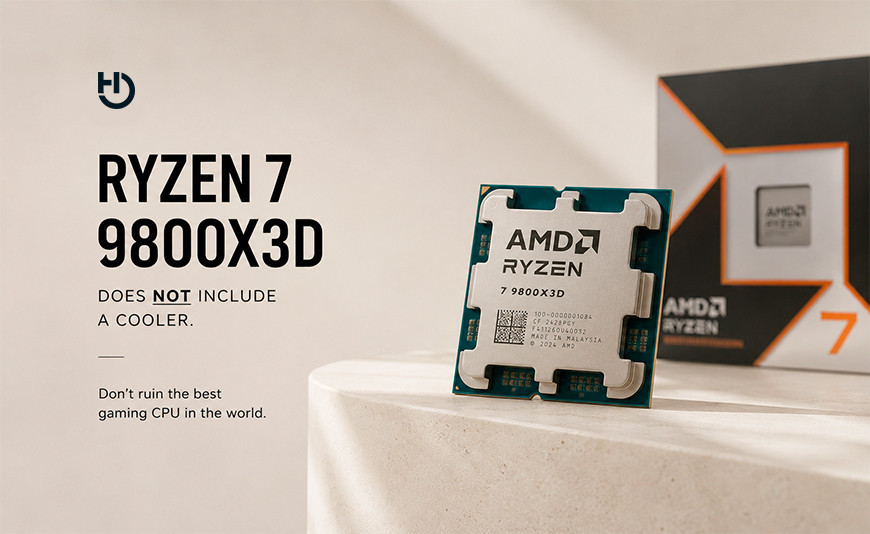
The fastest gaming CPU on the planet ships without a cooler:
here's what the Ryzen 7 9800X3D actually needs so it doesn't choke itself
The AMD Ryzen 7 9800X3D is, right now, the fastest gaming processor money can buy. It sits at the top of the charts in pretty much every gaming benchmark, packs 104 MB of cache thanks to second-generation 3D V-Cache, and boosts up to 5.2 GHz. It also has a 120 W TDP, a maximum temperature of 95 °C, and no cooler in the box. Skimp on cooling, and the chip throttles itself to stay safe, quietly handing back the very performance you paid for.
The essentials: the Ryzen 7 9800X3D and its cooling needs
120 W TDP, up to 145 W under real load. The 9800X3D is more efficient than its predecessors, but in heavy workloads like Cinebench it can pull as much as 145.7 W. Its official maximum temperature (Tjmax) is 95 °C.
The 3D cache is the real thermal bottleneck. Unlike earlier generations, where the V-Cache sat on top of the cores, on the 9800X3D it sits underneath, which actually helps temperatures. Still, it's a layer of silicon acting as a partial thermal barrier.
No cooler in the box. AMD doesn't bundle any cooling solution whatsoever. Whether you're about to buy one or already own one, you'll need an aftermarket cooler. Without it, the CPU throttles and drops its clocks to avoid overheating.
A good air cooler gets the job done. You don't need liquid cooling by default. A dual-fan tower cooler sized for 120–150 W keeps the 9800X3D under 85 °C in gaming and under 90 °C under sustained load.
When the Ryzen 7 9800X3D dropped to €329 with the ESAS55 code back in March, searches for it went through the roof. And right alongside them came a question that keeps popping up in forums, PcComponentes reviews, and Discord servers everywhere: "what cooler should I pair it with?" It's a fair question to ask, and not a simple one, because the answer hinges on what you actually use the CPU for, what case you're running, and how much fan noise you're willing to live with.
This guide answers exactly that, using the chip's real thermal data — no overselling liquid cooling, and no cutting corners on the recommendation either. If you already own a 9800X3D or you're about to buy one, the next few minutes are going to change how you think about cooling it.
1. Why the 9800X3D needs more cooling than it looks like it does
The confusion starts with its gaming numbers. In actual matches, the 9800X3D draws between 50 and 70 W — far below its 120 W TDP — because the 3D V-Cache stores data that would otherwise force more cores to stay active for longer. The upshot is a chip that runs surprisingly cool while you play. With a decent cooler, gaming temps typically land between 60 °C and 75 °C.
Things change the moment you do anything other than game. In Cinebench R23, real average draw jumps to 145.7 W and temperatures creep up toward 90–92 °C. Compiling code, rendering in Blender, or exporting video all behave much the same way. And if your cooler doesn't have enough headroom for that, the processor kicks in thermal throttling: it drops its clocks so it doesn't blow past the 95 °C ceiling, and you lose the performance you paid for in the process.
In plain terms: think of it like a sports car that sips fuel around town but guzzles it at full throttle on the highway. If the tank (your cooler) isn't built for that highway stretch, the car cuts power to protect itself. The 9800X3D does the exact same thing with its clock speeds once temperatures climb too high.
| Usage scenario | Estimated real draw | Temp with a good cooler | Throttling risk |
|---|---|---|---|
| Gaming (typical) | 50–70 W | 60–75 °C | Low |
| Gaming with background load | 80–100 W | 75–85 °C | Moderate without a solid cooler |
| Cinebench / rendering / compiling | ~145 W | 85–92 °C | High with an undersized cooler |
| Idle / everyday office use | ~15–25 W | 39–60 °C | None |
2. Air or liquid? The honest answer for the 9800X3D
This is the question that comes up most in forums — and it's the one with the most contradictory answers floating around. The short version: a solid dual-tower air cooler is all the 9800X3D needs; liquid cooling isn't required. The longer version means understanding what each type of cooling actually does and which one fits your setup.
Air vs. liquid for the Ryzen 7 9800X3D: the honest comparison
Dual-tower air cooler ✅ Recommended
Handles the 9800X3D's 120–150 W with room to spare. No complicated moving parts, no tubing, no risk of leaks. More reliable long-term and quieter than most people expect once you pair it with good PWM fans. The sensible pick for most builds.
240 mm AIO ✅ A solid option
A bit cooler than a dual-tower under sustained load. Worth considering if your case has more room for a radiator than for a tall air cooler, or if you just prefer the look. Look for tubing backed by at least a 5-year warranty from reputable brands.
360 mm AIO ⚠️ Overkill for gaming
More than the 9800X3D actually needs for gaming. It starts to make sense if you're pushing an aggressive overclock, or if your PC also grinds through heavy AI workloads or rendering for hours on end. For a mixed gaming/work setup, a dual-tower or a 240 mm AIO already has you covered.
3. Which cooler the Ryzen 7 9800X3D needs, based on how you use it
There's no one-size-fits-all answer here, because the 9800X3D doesn't behave the same way across every scenario. What there is, though, is a clear guide based on what you'll mainly be using it for.
| User profile | Minimum recommended cooler | Need liquid cooling? |
|---|---|---|
| Gaming only, nothing else | Single tower, properly sized (≥120 W) | No |
| Gaming + streaming / light work | Dual-tower | No |
| Gaming + rendering / Blender / compiling | Dual-tower or 240 mm AIO | Optional |
| Small-form-factor PC (SFF / mini-ITX) | 240 mm AIO (easier to fit the space) | Advisable |
| Extreme overclocking / local AI / 24/7 rendering | 360 mm AIO | Yes |
Hiditec DC20 PRO and DC40 PRO: real air cooling for the 9800X3D
AM5 socket compatible. No tubing, no risks, no fuss.
Hiditec DC20 PRO
PROFILE: PURE GAMING
Single-tower design with copper heatpipes and a PWM fan tuned for airflow. Ideal if gaming is what your PC is mainly for: it handles real in-game draw (50–70 W) with plenty of headroom, and stays quiet in that scenario.
See the Hiditec DC20 PRO on Amazon →Hiditec DC40 PRO
★ RECOMMENDED FOR THE 9800X3D
Dual tower with two PWM fans. More surface area and higher airflow than a single tower: it keeps the 9800X3D between 60–70 °C in gaming and under 80 °C even under sustained loads like Cinebench or rendering. The go-to choice for anyone who games and works on the same rig, without the added complexity of liquid cooling.
See the Hiditec DC40 PRO on Amazon →4. Your case matters more than you'd think
Even the best cooler on the market performs at half strength if your case doesn't have proper airflow. The 9800X3D generates heat that needs to get out of the case efficiently; if the airflow layout is off, your cooler ends up fighting against a 50–60 °C internal environment instead of the 25 °C of the room, and CPU temperatures climb accordingly.
The key ingredients of good airflow for the 9800X3D are: an unobstructed front intake, rear and top exhaust, cable management that doesn't block airflow, and enough clearance for a tower cooler at least 160 mm tall.
Hiditec H3 PRO: the case that won't choke your cooler
ATX and MicroATX compatible, with optimized airflow, built-in cable management, and clearance for coolers up to 165 mm tall. The natural companion to the DC20 PRO or DC40 PRO in a Ryzen 7 9800X3D build.
See the Hiditec H3 PRO on Amazon5. Full Ryzen 7 9800X3D specs: everything you need to know
| Specification | Detail |
|---|---|
| Architecture | AMD Zen 5 + 2nd-gen 3D V-Cache |
| Cores / threads | 8 cores / 16 threads |
| Base / boost clock | 4.7 GHz / 5.2 GHz |
| Total cache | 104 MB (8 MB L2 + 32 MB L3 + 64 MB stacked V-Cache) |
| Nominal TDP | 120 W |
| Peak real draw (load) | ~145 W |
| Maximum temperature (Tjmax) | 95 °C |
| Socket | AM5 |
| Supported memory | DDR5-5600 (JEDEC), up to DDR5-8000 OC |
| Multiplier | Unlocked (overclockable) |
| Cooler included | No · Recommended: Hiditec DC40 PRO → |
| Approximate price, July 2026 | ~€328–420 depending on retailer |
FAQ: the Ryzen 7 9800X3D and cooling it properly
The most common questions, answered with real data
Does the Ryzen 7 9800X3D absolutely need liquid cooling?
No. A dual-tower air cooler properly sized for 120–150 W is enough for most people. Liquid cooling starts to make sense if you're running an aggressive overclock, if your case doesn't have the clearance for a tower cooler, or if the PC is grinding through heavy, sustained workloads for hours at a stretch.
What's a normal temperature for the 9800X3D while gaming?
Anywhere between 60 °C and 80 °C with a decent cooler is perfectly normal and safe. The official maximum (Tjmax) is 95 °C; stay under that and the chip runs at full performance without cutting clock speeds.
What is thermal throttling, and how do I avoid it?
Thermal throttling is the automatic clock-speed cut the processor applies once it crosses its maximum temperature. You avoid it with a cooler properly sized for the 9800X3D's peak draw (~145 W under load) and a case with solid airflow.
Is the 9800X3D compatible with B650 motherboards?
Yes, it's compatible with any AM5 board, B650 included. A board with a strong VRM section is recommended to get the most out of it, especially if you plan to take advantage of the unlocked multiplier for overclocking. B850 or X870 boards give you more headroom.
Is the 9800X3D still worth it in 2026 with RAM prices this high?
More than ever, precisely because 3D V-Cache reduces how much the CPU depends on RAM speed. It shines with DDR5-6000, but even with slower, cheaper kits the impact on gaming performance is minimal. It's the one processor on the market where the RAM crunch stings the least.
Sources:
- PcComponentes: AMD Ryzen 7 9800X3D — specs, reviews and pricing (July 2026)
- TecnoGaming: AMD Ryzen 7 9800X3D review — real-world temperatures and power draw under load
- Tech4Gamers: The best coolers for the Ryzen 7 9800X3D in 2026 (with benchmarks)
- Corsair: Best CPU cooler for the Ryzen 7 9800X3D
- Corsair: AMD Ryzen 7 9850X3D vs. 9800X3D — differences and TDP at CES 2026
- El Chapuzas Informático: The AMD Ryzen 7 9800X3D drops to an all-time low price
- Gizmodo ES: The Ryzen 7 9800X3D drops 38% — the best gaming CPU on the market hits an all-time low at €329
- Amazon Spain: Hiditec H3 PRO — ATX/MicroATX case with optimized airflow





Leave a Reply Cancel Reply