
 Español
  Português PT
Best PSU for NVIDIA RTX 50 and AMD RX 9000 in 2026
- 23 Jun, 2026
- Home , News
- 0 Comments
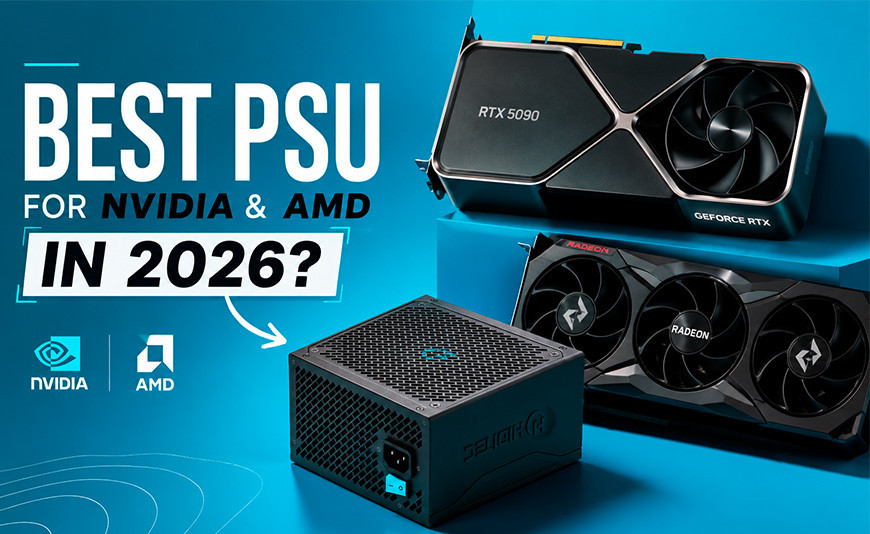
Best PSU for NVIDIA RTX 50 and AMD RX 9000 in 2026:
what your GPU actually needs and nobody tells you
The RTX 50 and RX 9000 series bring new connectors, higher power spikes and certification requirements that make the PSU, for the first time, just as critical as the GPU itself. This guide breaks down exactly what each card needs and why the Hiditec BZ PRO ticks every box without breaking a sweat.
The essentials before you pick a PSU in 2026
ATX 3.1 and PCIe 5.1 are the new baseline. The RTX 5060, 5070, 5080 and the RX 9070 XT all use the 12V-2×6 connector natively. A PSU without ATX 3.1 certification may work with an adapter, but it was never engineered to handle the real-world power spikes these GPUs throw at it.
Wattage is only half the story. A poorly built 750 W unit can be less reliable than a solid 650 W one. Efficiency, electrical protections and voltage stability are what determine whether your rig holds up under a real gaming load.
RTX 50 power spikes go well beyond their rated TDP. An RTX 5070 with a 250 W TDP can spike to 350 W for milliseconds at a time. A PSU without enough headroom will stumble exactly at that moment, and your screen will tell you about it.
NVIDIA and AMD use different connectors this generation. Most RX 9000 AIB models stick with standard PCIe 8-pin (6+2) connectors, while all RTX 50 cards go native 12V-2×6. A PSU that covers both standards handles every build scenario you can throw at it.
Every time a new GPU generation drops, everyone talks about performance, VRAM and price-to-performance. Nobody talks about the PSU. Not until the system shuts off mid-game, or the display starts flickering under full load. In 2026, with NVIDIA Blackwell and AMD RDNA 4 both in the wild, this problem is more real than it has ever been.
The RTX 5060, 5070, 5080 and 5090, and the RX 9070 and 9070 XT, all bring new connectors, tighter power specifications and transient spikes that older PSUs simply were not built to handle. This guide covers exactly what each GPU demands from a power supply and how the Hiditec BZ PRO meets every one of those requirements right out of the box.
1. Why ATX 3.1 and PCIe 5.1 actually matter with next-gen GPUs
ATX 3.1 and PCIe 5.1 are not just buzzwords on a spec sheet. They represent concrete engineering changes designed specifically to address the power transient problem that modern GPUs expose, a real-world issue that became impossible to ignore with the RTX 4090 melted-cable debacle of 2022 and 2023.
The plain English version: Think of your GPU as a sports car that goes from 0 to 150 mph in a fraction of a second. The PSU is the engine. An older unit was built for steady highway cruising, not for brutal acceleration spikes. ATX 3.1 requires the PSU to deliver up to 200% of the GPU's rated TDP for at least 100 microseconds without going unstable. Units that fall short of that spec fold exactly when you need them most.
| Spec | What it guarantees | Why it matters with RTX 50 / RX 9000 |
|---|---|---|
| ATX 3.1 | Power transient handling up to 200% TDP for 100 microseconds | RTX 5070/5080 spike to 350–500 W in real-world gaming loads |
| PCIe 5.1 | Native support for the 12V-2×6 connector (up to 600 W per cable) | Every RTX 50 GPU from NVIDIA uses this connector as standard |
| Native 12V-2×6 cable | No adapters: direct, safe connection between PSU and GPU | 6+2 to 12VHPWR adapters were the root cause of the RTX 4090 melted-cable issue |
| Dual PCIe 6+2 cables | Full compatibility with AMD's standard PCIe connectors | Most RX 9070 and 9070 XT AIB models use 8-pin (6+2) connectors |
2. How many watts does each GPU actually need in 2026: full NVIDIA and AMD table
PSU wattage is not just about the GPU. Your CPU, RAM, drives and everything else on the rails adds up. The golden rule is to calculate your full system's maximum draw and leave 30 to 40% headroom on top of that, both for transient spikes and to keep the PSU running in its efficiency sweet spot.
| GPU | Rated TDP | Minimum PSU | Recommended with headroom | BZ PRO pick |
|---|---|---|---|---|
| RTX 5060 | 145 W | 550 W | 650 W | BZ PRO 650 W |
| RTX 5070 | 250 W | 650 W | 750 W | BZ PRO 750 W |
| RTX 5070 Ti | 300 W | 750 W | 850 W | BZ PRO 850 W |
| RTX 5080 | 360 W | 850 W | 850–1000 W depending on CPU | BZ PRO 850 W |
| RX 9070 | 220 W | 650 W | 750 W | BZ PRO 750 W |
| RX 9070 XT | 250 W | 700 W | 750–850 W | BZ PRO 750 or 850 W |
3. NVIDIA RTX 50 Series: what your PSU needs to handle it
Blackwell goes all-in on the 12V-2×6 connector across the entire lineup. The problematic 12VHPWR from last generation is gone, replaced by a more robust connector with a mechanical latch that eliminates the partial-insertion risk that caused so much trouble with the RTX 4090.
What changed from 12VHPWR to 12V-2×6 and why it matters
Improved mechanical latch
The 12V-2×6 connector features a redesigned retention system that ensures a full, secure seat every time. The RTX 4090 melt incidents were partly caused by partial insertions that concentrated resistance across fewer pins, generating localised heat until something gave way.
Up to 600 W through a single cable
Designed to feed even the RTX 5090's 575 W TDP, the 12V-2×6 delivers everything through one cable without the daisy-chained 6+2 adapters that caused so many headaches last gen. One cable, one connection, done.
Native vs. adapter: not the same thing
A PCIe 5.1-certified PSU like the BZ PRO ships with the 12V-2×6 cable as a native inclusion. Plugging an adapter from a 6+2 connector on an older, non-certified PSU is a workaround, not a solution, especially for TDPs above 300 W.
For the RTX 5060 and 5060 Ti, with TDPs ranging from 145 to 180 W, any solid ATX 3.1 unit in the 600 to 650 W range is more than enough. Your system will run at around 40% PSU load, which is right in the efficiency sweet spot for 80 Plus Bronze. The Hiditec BZ PRO 650 W is the natural fit here: ATX 3.1, native 12V-2×6 cable included, and exactly the right amount of headroom for a mid-range build.
For the RTX 5070 (250 W TDP, spikes to 350 W), the BZ PRO 750 W is the obvious call. Paired with a mid-range CPU like a Ryzen 5 or Core i5, total system draw under full load sits around 450 to 500 W, keeping the PSU at 60 to 65% load — the sweet spot for efficiency, thermals and noise.
For the RTX 5070 Ti and RTX 5080, with TDPs of 300 and 360 W respectively and transient spikes well above 400 W, the BZ PRO 850 W gives you the margin to absorb those spikes cleanly, especially when paired with a performance-class CPU like the Ryzen 7 9800X3D or a latest-gen Core i7.
4. AMD RX 9000 Series: better efficiency, familiar connectors
RDNA 4 takes a different approach to connectors compared to NVIDIA: most RX 9070 and 9070 XT AIB models ship with standard PCIe 8-pin (6+2) connectors, the same ones that have been in the market since 2016. That makes compatibility with existing PSUs straightforward, but it does not remove the need for a quality power supply underneath.
RX 9070 (220 W TDP)
The RX 9070 is one of the best performance-per-watt GPUs of this generation. Its 220 W TDP is well within the reach of any solid 650 W PSU. In a complete system with a mid-range CPU, total draw under full load sits around 380 to 420 W.
BZ PRO recommendation: BZ PRO 650 W for budget-conscious builds · BZ PRO 750 W if you are running a high-end CPU or pulling double duty with editing and streaming at the same time.
RX 9070 XT (250 W TDP)
The RX 9070 XT has been one of the most talked-about value plays of 2026. With a 250 W TDP and spikes that can reach 300 to 320 W, it needs a PSU with solid headroom and stable voltage regulation to deliver a consistent, stutter-free experience.
BZ PRO recommendation: BZ PRO 750 W for pure gaming builds · BZ PRO 850 W if the system includes a power-hungry CPU or sees heavy professional workloads.
5. The Hiditec BZ PRO: why it checks every box for 2026 builds
The BZ PRO is not a generic PSU with a new sticker on it. It was built from the ground up to meet the ATX 3.1 and PCIe 5.1 specs that current GPUs demand, and it ships with every connector that NVIDIA and AMD need. Here is what sets it apart on paper and in practice:
| Feature | BZ PRO 650 W | BZ PRO 750 W | BZ PRO 850 W |
|---|---|---|---|
| Certification | ATX 3.1 · PCIe 5.1 | ATX 3.1 · PCIe 5.1 | ATX 3.1 · PCIe 5.1 |
| Native NVIDIA cable | 12V-2×6 included | 12V-2×6 included | 12V-2×6 included |
| AMD-compatible cables | 2 × dual PCIe 6+2 | 2 × dual PCIe 6+2 | 3 × dual PCIe 6+2 |
| Efficiency | 80 Plus Bronze (85%+) | 80 Plus Bronze (85%+) | 80 Plus Bronze (85%+) |
| Electrical protections | OCP · OVP · SCP · OPP · UVP · OTP | OCP · OVP · SCP · OPP · UVP · OTP | OCP · OVP · SCP · OPP · UVP · OTP |
| Capacitors | Japanese 105°C | Japanese 105°C | Japanese 105°C |
| Fan | 140 mm FDB thermo-regulated | 140 mm FDB thermo-regulated | 140 mm FDB thermo-regulated |
| Warranty | 7 years | 7 years | 7 years |
Why Japanese 105°C capacitors are not just a spec line
Real-world longevity
85°C capacitors degrade quickly once the internal PSU temperature climbs above 50 to 60°C, which is routine in high-performance builds. 105°C caps hold their electrical properties under those same conditions for years, not months.
Voltage stability
Japanese capacitors minimise voltage ripple, the small fluctuations on the output rails that, over time, can introduce instability into your CPU, GPU and RAM. A PSU with quality caps is electrically quieter, and that silence translates directly into system stability.
TÜV Rheinland certified
The BZ PRO is certified by TÜV Rheinland, one of the most rigorous independent electrical safety labs in the world. That certification is not a marketing badge. It means the declared specs have been verified under full-load conditions by a third party with no stake in the outcome.
AVAILABLE ON AMAZON
Hiditec BZ PRO · From 650 W to 850 W
ATX 3.1 · PCIe 5.1 · Native 12V-2×6 cable · 7-year warranty · TÜV Rheinland certified
SHOP HIDITEC BZ PRO ON AMAZON6. Which BZ PRO do you need: quick picker by build
No time for the maths? Find your GPU and CPU tier below and the right model picks itself:
| GPU | Mid-range CPU (Ryzen 5/7 · Core i5/i7 efficient) | High-end CPU (Ryzen 9 · Core i9 · creative workloads) |
|---|---|---|
| RTX 5060 · RX 9060 XT | BZ PRO 650 W | BZ PRO 650 W |
| RTX 5070 · RX 9070 | BZ PRO 750 W | BZ PRO 750 W |
| RTX 5070 Ti · RX 9070 XT | BZ PRO 750 W | BZ PRO 850 W |
| RTX 5080 | BZ PRO 850 W | BZ PRO 850 W + headroom |
PSU FAQ for RTX 50 and RX 9000 builds
Everything you need to know before you hit Add to Cart on that PSU
Can I use my old PSU with an RTX 5070 or RX 9070?
It depends. If your PSU is more than four or five years old and does not carry ATX 3.0 certification or higher, it was not built to handle the transient spikes these GPUs produce. It may run fine at average loads but stumble during peak demand, leading to crashes or unexpected shutdowns. If the wattage is adequate but the unit lacks a native 12V-2×6 cable for an RTX 50, you will need an adapter — which is not ideal for TDPs above 300 W. The honest recommendation: if you are investing in a next-gen GPU, pair it with a next-gen PSU from day one.
What is the real difference between 80 Plus Bronze and 80 Plus Gold?
The 80 Plus rating indicates minimum efficiency at 20%, 50% and 100% load. Bronze guarantees at least 85% efficiency across those thresholds. Gold pushes that to 87 to 90%. In practice, for a gaming rig running four to six hours a day, the difference in actual electricity cost between Bronze and Gold amounts to roughly five to fifteen euros per year. The BZ PRO 80 Plus Bronze delivers class-leading build quality and reliability without the price premium of a Gold certification you will never feel on your electricity bill.
Why does the Hiditec BZ PRO carry a 7-year warranty?
The 7-year warranty on the BZ PRO is a direct reflection of its internal component quality. The Japanese 105°C capacitors inside are rated for over 100,000 hours of operation under load. A long warranty is not a sales pitch; it is the manufacturer putting their money where their mouth is. Most mid-range PSUs top out at three to five years. Seven years puts the BZ PRO firmly in professional-grade territory.
Is the BZ PRO loud under load with an RTX 5070?
Not in any meaningful way. The 140 mm FDB (Fluid Dynamic Bearing) fan is thermo-regulated, meaning it only spins faster when the PSU's internal temperature actually calls for it. In a typical gaming system with an RTX 5070 running for hours at medium to high load, the PSU fan rarely exceeds 800 to 1,000 RPM. At those speeds, a 140 mm fan is practically inaudible against the GPU and case fans already doing their job in the background.
Does the BZ PRO fit any standard ATX case?
Yes. The BZ PRO ships in a standard ATX form factor at 150 × 85 × 160 mm, compatible with any ATX, Micro-ATX or full-tower case on the market. It works equally well in cases with a PSU shroud that tucks the unit away at the bottom of the chassis, keeping your cable management clean and your airflow unobstructed.
Sources:
- Hiditec BZ PRO on Amazon Spain (official specifications)
- AioShop: Hiditec BZPRO 750 W (specifications)
- PC Game Check: What PSU do you need for RTX 5070, 5080 and 5090 in 2026
- PCGamingBCN: RTX 5060 vs RTX 5070, power draw and comparison 2026
- MejorPC: What PSU does my PC need depending on GPU and CPU
- Hiditec Blog: Modular vs non-modular PSU, gaming guide 2026
- Hiditec Blog: Why OVP/UVP protections matter more than wattage

Leave a Reply Cancel Reply