
 Español
  Português PT
PC Fans 2026: PWM, ARGB and DC Definitive buying guide | Hiditec Global
- 11 Jun, 2026
- Home , News
- 0 Comments
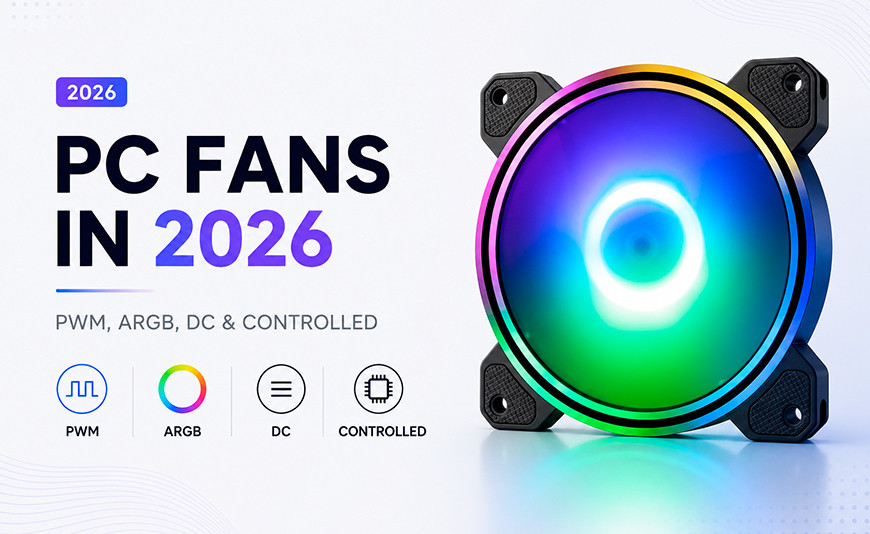
PC fans in 2026:
PWM, DC, ARGB and controllers ¿Which one you need for your build and why they're not all the same?
There are hundreds of fans on the market and they all look the same until you check the details. The difference between a basic fan, a PWM fan, an ARGB fan and one with a controller hub isn't just aesthetic: it directly affects thermal performance, noise level and whether your build will work the way you expect. This guide explains everything without unnecessary jargon.
The essentials before buying a fan
Size matters, but it's not everything. A well-designed 120 mm fan can move more air with less noise than a poorly designed 140 mm one. CFM (airflow) and dBA (noise level) are the two numbers that really determine whether a fan is right for your use.
PWM isn't just for gaming. PWM speed control (4-pin) lets the fan spin slower when the system doesn't need it. That means silence at idle and power when required. Any build benefits from this, not just gaming ones.
ARGB is aesthetics, not performance. Addressable LEDs don't affect airflow or temperature. But if your case has a tempered glass panel and you want it to look great, choosing ARGB from the start is cheaper than adding it later.
The bearing determines lifespan. A fan with a hydraulic or FDB (Fluid Dynamic Bearing) lasts between 40,000 and 80,000 hours. One with a basic sleeve bearing can start making noise in 2 or 3 years. For a component that will run for thousands of hours, the bearing matters.
Most fan buyers go by two criteria: price and whether they have RGB lighting. The problem is that neither of those tells you whether the fan will move the air your system needs, whether it will last five years, or whether it will work correctly with your motherboard. This guide gives you the right criteria.
And at the end, we tell you exactly which fan we recommend for each build type: gaming, office and design/workstation, with the technical reasoning behind each recommendation.
1. The types of fans that exist and what each one means
Before getting into recommendations, it's worth understanding what differentiates each type. There's no single official classification: in practice a fan can be both PWM and ARGB. The categories refer to different characteristics that can be combined.
The 4 types of fans you'll find on the market
Basic DC (3-pin)
The simplest type. Runs at fixed speed or with voltage variation from the motherboard. No precise speed control. Cheaper but less efficient. Suitable for basic office use where noise isn't critical. 3-pin connector.
PWM (4-pin) ✓ Recommended
Precise speed control via PWM signal from the motherboard. Can range from 200 RPM (near-silent) to maximum based on actual system temperature. The smartest option for any build: silence at idle and power when needed. 4-pin connector.
ARGB (Addressable LEDs)
Lighting with individually controllable LEDs, allowing advanced colour effects synchronised with the motherboard or software. Does not affect thermal performance. Requires ARGB 3-pin 5V connector on the motherboard for full control. Compatible with ASUS Aura, MSI Mystic Light, Gigabyte RGB Fusion.
Controller hub
Not a fan type but an accessory that allows you to control multiple fans from a single motherboard header. Useful when you have more fans than available headers. Some include integrated ARGB lighting control. Essential in builds with 5 or more fans.
2. The numbers that matter: CFM, dBA, RPM and static pressure explained
Fan spec sheets are full of numbers that few guides explain clearly. These are the ones that actually matter for making the right buying decision:
| Parameter | What it measures | When it matters most | Good reference value |
|---|---|---|---|
| CFM | Airflow in cubic feet per minute | Case fans (intake/exhaust) | Above 40 CFM for 120 mm |
| dBA | Noise level in decibels | Always, especially for office and design use | Below 25 dBA at maximum RPM |
| RPM | Rotational speed | Performance and maximum noise reference | 800 to 1,800 RPM for 120 mm gaming |
| Static pressure (mmH₂O) | Ability to move air against resistance | AIO radiators and dense filters | Above 2 mmH₂O for radiators |
| MTBF | Estimated lifespan in hours | Long-term builds, workstations | Above 40,000 hours |
3. Bearings: the factor that decides how long your fan lasts
The bearing is the mechanism that allows the fan shaft to spin. It's the component that most influences long-term lifespan and noise level. Nobody talks about this when selling fans, but it's what separates a fan that still works perfectly in 2030 from one that starts making noise next year.
Sleeve bearing
The cheapest and least durable. Works fine horizontally but degrades faster vertically. Starts to vibrate and make noise after 2 to 3 years of continuous use.
Best for: very low-budget builds that will be replaced soon.
Hydraulic bearing
Oil as lubricant instead of physical contact. Quiet, works in any orientation and offers a lifespan of 40,000 to 50,000 hours. Excellent balance between price and durability.
Best for: gaming and work builds on a tight budget.
FDB (Fluid Dynamic Bearing)
The evolution of the hydraulic bearing. Creates a dynamic oil film that separates the moving parts. Minimal friction, minimal noise and a lifespan of 50,000 to 80,000 hours. The quality standard in mid-to-high-end fans.
Best for: any build that wants to forget about fans for years.
4. How many fans does your PC need and where should they go?
The number and position of fans matters more than brand or model. A badly positioned fan can be worse than having none at all. The basic rule is: cold air enters through the front and sides (intake), hot air exits through the rear and top (exhaust).
| Build type | Minimum fans | Recommended setup | Priority |
|---|---|---|---|
| Basic office use | 1 a 2 | 1 front intake + 1 rear exhaust | Maximum silence |
| Mid-range gaming | 3 | 2 front intake + 1 rear exhaust | Noise/temperature balance |
| High-end gaming / Design | 5 | 3 front intake + 1 rear exhaust + 1 top exhaust | Temperature and positive pressure |
| Workstation / Active OC | 6 a 7 | 3 front intake + 2 top exhaust + 1 rear exhaust | Maximum cooling with controller hub |
5. Which fan to buy for your build: gaming, office and design
With all the technical groundwork clear, here are the concrete recommendations by use profile. Each with the reasoning behind it so you can adapt the decision to your specific situation.
Gaming Build
RTX 5070 / RTX 5080 · Ryzen 7 9800X3D or equivalent · Tempered glass panel · Intensive use
What you need
PWM control so fans ramp up automatically during long gaming sessions without noticeable noise at idle. ARGB if you have a glass panel. Hydraulic or FDB bearing for real durability. Minimum 40 CFM per fan at mid RPM.
Hiditec recommendation
Hiditec ARGB PWM 120mm fan pack — 37.8 CFM, 19.5 dBA, hydraulic bearing, 4-pin PWM, 3-pin 5V ARGB compatible with all major motherboards. 50,000-hour MTBF. Sync with ASUS Aura, MSI Mystic Light and Gigabyte RGB Fusion. The most complete gaming option with excellent performance-to-price ratio.
Ideal setup
3 units at front intake + 1 rear exhaust + 1 top exhaust. With a case like the Hiditec H3 PRO (up to 10 x 120 mm fans) you have room to scale if you add overclocking or a higher-draw GPU. The result: CPU and GPU temperatures below 75 °C during sustained 4K gaming.
Office Build
No dedicated GPU or integrated graphics · Mid-range processor · Everyday use without heavy load · Silence is the priority
Qué necesitas
Absolute silence at idle. An office processor's TDP rarely exceeds 65 W, so you don't need large airflow volumes. The most important thing is that the fan is nearly inaudible during working hours. PWM recommended so it stays at minimum RPM most of the time.
Recomendación Hiditec
Hiditec ARGB PWM 120mm fan pack — under light load, PWM keeps it at 800 RPM generating just 9 dBA, virtually inaudible. For office use you only need 2 units (1 front + 1 rear). The quietest option in the Hiditec range without sacrificing cooling capacity when the system needs it.
Configuración ideal
Minimum 2 units: 1 front intake and 1 rear exhaust. In an office build with a standard mid-tower case that's more than enough. Set the PWM curve in the BIOS so fans run at minimum below 60 °C and scale up smoothly above it. The result is a completely silent PC 90% of the time.
Design / Workstation Build
Video editing · Graphic design · 3D rendering · Prolonged use under high load · Silence important but temperature critical
Qué necesitas
The most demanding combination: silence during creative work and real cooling during renders. A 12 or 16-core processor under rendering load can generate 150 to 200 W continuously for hours. You need real airflow volume, PWM to manage noise when you're not rendering, and long-life bearings because the PC will be on for many hours a day.
Recomendación Hiditec
Hiditec ARGB PWM 120mm fan pack — for workstation use we recommend a minimum of 5 units. Under full rendering load, PWM ramps to maximum RPM delivering the necessary 37.8 CFM. At idle or during creative work without active rendering, it drops back to minimum. The hydraulic bearing with 50,000-hour MTBF handles the intensive use of a design workstation perfectly.
Configuración ideal
5 unidades: 3 front intake + 1 rear exhaust + 1 top exhaust. Si el chasis lo permite añade un hub controlador para gestionar todos desde un único header de la placa. Configura dos perfiles en la BIOS: perfil silencioso para trabajo creativo (todos a 30% de RPM) y perfil render (todos al 100% automáticamente cuando la CPU supera los 75 °C).
6. Summary table: which fan for each need
| Need | Essential type | ARGB needed | How many | Minimum bearing |
|---|---|---|---|---|
| Basic office use | PWM or basic DC | No | 2 | Hydraulic |
| Mid-range gaming | PWM 4-pin | Opcional | 3 | Hydraulic |
| High-end gaming with glass panel | PWM 4-pin + ARGB | Sí | 5 | Hydraulic / FDB |
| Design / Workstation | PWM 4-pin + hub | Opcional | 5 a 6 | FDB preferred |
| OC activo / Overclock | PWM 4-pin + controller hub | Opcional | 6 a 7 | FDB mandatory |
Frequently asked questions about PC fans
The most common questions before buying fans for your build
Do ARGB fans use more electricity than regular ones?
The additional power draw from ARGB LEDs is minimal, between 0.5 and 2 W per fan depending on the number of LEDs and brightness. For a build with 5 ARGB fans, that's a maximum of 10 W extra in total — an irrelevant amount for both electricity consumption and heat generated. The impact on temperature or electricity bill is practically zero.
Can I connect a 4-pin PWM fan to a 3-pin header?
Yes, it's physically compatible: the 4-pin connector fits in a 3-pin header because the first three pins are identical. The fan will work but will lose PWM control and spin at fixed speed or with basic voltage control. It's preferable to use a 4-pin header whenever possible to take advantage of full speed control.
What's the difference between RGB and ARGB?
RGB (4-pin 12V connector) controls all the fan's LEDs as a group: they all change to the same colour simultaneously. ARGB (3-pin 5V connector) controls each LED individually, allowing dynamic colour effects like waves, rainbows, music reaction or game synchronisation. ARGB requires an ARGB 5V header on the motherboard. If your board doesn't have that header, you'll need an external controller to use addressable effects.
How many fans can I connect to my motherboard?
Most motherboards have between 3 and 6 fan headers (CPU_FAN, CPU_OPT, CHA_FAN1, CHA_FAN2, etc.). Each header can power between 1 and 2 x 120 mm fans in terms of amperage. If you need more fans than available headers, the solution is a fan controller hub that connects multiple fans to a single header. Quality hubs also allow PWM control of all connected fans from that single header.
Is a 140 mm fan better than a 120 mm one?
In theory yes: at the same RPM, a larger fan moves more air with less noise because the blade surface area is greater. But in practice, the advantage only shows if your case has 140 mm slots and the specific fan is well designed. A quality 120 mm fan can easily outperform a low-end 140 mm one in real-world performance. The rule: first check what size your case supports, then choose the best fan available in that size — don't force adaptations that reduce efficiency.
Sources and references:
- Amazon: Hiditec ARGB PWM 120mm fan pack — official specifications
- PcComponentes: Hiditec N18 ARGB 120mm — 37.8 CFM, 19.5 dBA, hydraulic bearing, 50,000h MTBF
- Hiditec: N9 ARGB — dual-ring 120mm fan (official specifications)
- Hiditec: C12 PWM ARGB — CPU cooler with 120mm PWM fan (official specifications)
- Hiditec Blog: Is Your PC Overheating? Complete airflow guide 2026
- Hiditec: H3 PRO Mid Tower case — compatible with up to 10 x 120mm fans
- Hiditec Blog: Complete PC component compatibility guide 2026





Leave a Reply Cancel Reply