
 Español
  Português PT
What PSU Do You Need for an RTX 4080 or RTX 4090 in 2026? | Hiditec Global
- 19 May, 2026
- Home , News
- 0 Comments
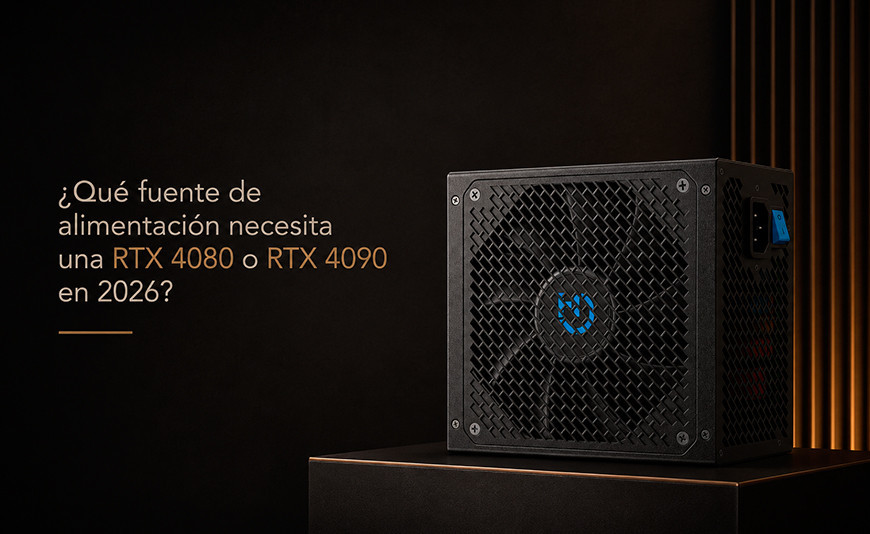
What Power Supply Does an
RTX 4080 or RTX 4090 Actually Need in 2026?
The most expensive component in your build is powered by the one that gets the least attention. An underpowered PSU doesn't just shut your PC down at the worst moment — it can silently degrade performance for months before you notice. This guide gives you the exact answer for your configuration.
Quick Answer: Wattage Requirements by GPU and CPU
RTX 4080 + mid-range CPU (Ryzen 7 / Core i7) Total system draw: 500–560 W. Recommended PSU: 750 W. The unit runs at 66–75% load — peak efficiency zone.
RTX 4080 + high-end CPU (Core i9 / Ryzen 9) Total system draw: 580–640 W. Recommended PSU: 750 W minimum, 850 W optimal.
RTX 4090 + mid-range CPU (Ryzen 7 / Core i7) Total system draw: 600–660 W. Recommended PSU: 850 W. Enough headroom without overspending.
RTX 4090 + high-end CPU with OC Total draw: 800 W or more at peak. Recommended PSU: 1,000 W. No debate needed.
When building a high-end PC, you carefully choose the GPU, CPU, RAM, and storage. But the power supply is usually selected last, with whatever budget remains. That's understandable — it has no clock speed, no visible benchmark, it doesn't appear in performance reviews. Yet it powers everything else, and it's the component most likely to take the rest down with it if it fails.
In 2026, with GPUs firing microsecond current spikes that can triple their rated TDP, the ATX 3.1 standard and the 12V-2x6 connector are not optional for a serious build — they are the bare minimum. This guide explains exactly what you need for your configuration, with real-world power draw data and verified recommendations.
1. Real Power Draw of the RTX 4080 and RTX 4090: What the Label Doesn't Tell You
The TDP figures NVIDIA publishes are thermal design power — not actual load consumption. Under real gaming conditions, and especially in stress tests, the numbers can be significantly higher. More importantly: modern GPUs generate extremely short current spikes (microseconds in duration) that can triple their instantaneous draw.
Put simply: Think of the RTX 4090 like a sports car that averages 30 mpg on the motorway. But when you floor it from a standstill, the engine demands fuel at a rate far beyond the steady-state average for a fraction of a second. Your power supply has to absorb that spike without flinching. Cheap units can't. Quality ones can.
| GPU | NVIDIA Official TDP | Measured Peak Spike | Typical Gaming Draw | Min. PSU (full system) | Optimal PSU |
|---|---|---|---|---|---|
| RTX 4070 Ti Super | 285 W | 340 W | 250–280 W | 700 W | 850 W |
| RTX 4080 | 320 W | 370 W | 260–310 W | 750 W | 850 W |
| RTX 4080 Super | 320 W | 370 W | 265–315 W | 750 W | 850 W |
| RTX 4090 | 450 W | 520 W | 380–440 W | 850 W | 1,000 W |
| RX 7900 XTX | 355 W | 400 W | 300–350 W | 800 W | 850 W |
2. How Many Watts Does Your System Actually Need?
The correct formula is straightforward: add your CPU TDP, your GPU TDP, and roughly 50–60 W for the rest of the system (motherboard, RAM, SSD, fans), then add a 20–25% margin so the PSU operates at its efficiency sweet spot.
Real Build Scenarios in 2026 and the PSU You Need
RTX 4080 + Ryzen 7 7700X
CPU: 105 W + GPU: 320 W + system: 45 W = 470 W
With 25% margin: 587 W
Optimal PSU: 750 W
RTX 4080 + Core i7-14700K
CPU: 125 W + GPU: 320 W + system: 50 W = 495 W
With 25% margin: 619 W
Optimal PSU: 750 W
RTX 4090 + Ryzen 7 7800X3D
CPU: 120 W + GPU: 450 W + system: 50 W = 620 W
With 25% margin: 775 W
Optimal PSU: 850 W
RTX 4090 + Core i9-14900K OC
CPU: 253 W + GPU: 450 W + system: 60 W = 763 W
With 25% margin: 953 W
Optimal PSU: 1,000 W
3. 80 Plus Ratings: What They Mean and Which One You Actually Need
The 80 Plus certification measures energy efficiency — what percentage of the electricity drawn from the wall is converted into usable power for your components. The rest is lost as heat, which raises the PSU's internal temperature, forces the fan to work harder, and accelerates capacitor ageing.
| Rating | Efficiency at 20% | Efficiency at 50% | Efficiency at 100% | Best suited for |
|---|---|---|---|---|
| 80 Plus (White) | 80% | 80% | 80% | Very tight budgets |
| 80 Plus Bronze | 82% | 85% | 82% | Mid-to-high-end gaming with quality internals |
| 80 Plus Gold | 87% | 90% | 87% | High-performance gaming, intensive use |
| 80 Plus Platinum | 90% | 92% | 89% | Enthusiast, workstation, 24/7 use |
| 80 Plus Titanium | 92% | 94% | 91% | Server, professional workstation 24/7 |
4. ATX 3.1 and the 12V-2x6 Connector: Why They Matter with an RTX 4080 or 4090
ATX 3.1 is the most recent revision of the electrical specifications for power supplies. Its most significant improvement over ATX 2.x is how it handles the transient current excursions produced by modern GPUs. ATX 3.1 requires the PSU to sustain excursions up to 200% of the GPU's TDP without triggering protection circuits. Older ATX 2.x units don't meet this requirement and can shut down or throttle performance during these spikes.
The 12V-2x6 connector (also known as PCIe 5.1) is the successor to the 12VHPWR introduced with the RTX 4090. Designed to eliminate the melting connector issue that affected early 4090 units, the 12V-2x6 features an improved mechanical design with sense pins that prevent incorrect insertion. If you're buying a new PSU in 2026 for a high-end GPU, a native 12V-2x6 connector is the minimum requirement. Adapters from 3x8-pin work, but they are the weakest link in the power delivery chain.
ATX 3.1: What It Brings
- Transient excursion support up to 200% of GPU TDP
- Better voltage regulation under load spikes
- Greater system stability with Ada Lovelace and Blackwell GPUs
- Native compatibility with the 12V-2x6 connector
- Required for any serious 2026 build
Without ATX 3.1: The Risks
- Sudden shutdowns during GPU current spikes
- Incorrect OCP protection triggering
- Reliance on 3x8-pin adapters with more failure points
- Worse voltage stability under transient loads
- GPU performance artificially capped in some scenarios
5. Hiditec BZ PRO 750W: An Honest Technical Review
If you've been searching for the best 750 W PSU for an RTX 4080 without paying the premium of the most established brands, the Hiditec BZ PRO 750W is an option that deserves serious consideration — not because it's ours, but because its internal specifications justify it. Here are the numbers.
Hiditec BZ PRO 750W: Full Technical Specifications
POWER & CERTIFICATION
Continuous output: 750 W
Rating: 80 Plus Bronze
Standard: ATX 3.1 + PCIe 5.1
TÜV Rheinland certified
CONNECTIVITY
Native 12V-2x6 cable included
2x PCIe 6+2 pin dual connectors
2x EPS 4+4 pin CPU
6x SATA + 2x Molex
INTERNAL QUALITY
Japanese 105°C capacitors
High-precision SMT technology
DC/DC conversion for stability
140 mm ultra-quiet fan
PROTECTIONS & WARRANTY
OVP + UVP + OCP + OPP + SCP + OTP
Full protection suite
7-year official warranty
Hiditec technical support
Why Japanese Capacitors Are Not a Marketing Gimmick
This is one of the most important and least discussed points in the PSU world. Electrolytic capacitors are the fastest-ageing components in a power supply. Low-quality ones degrade their capacitance within 2–3 years under load and heat. Japanese capacitors from brands such as Nippon Chemi-Con, Nichicon, or Rubycon are rated to 105°C (versus 85°C for budget alternatives), carry a certified lifespan of 5,000–10,000 hours, and have a much lower equivalent series resistance (ESR), which translates to more stable voltages under the current spikes generated by modern GPUs.
In practical terms: a PSU with Japanese capacitors holds the +12V rail voltage more steadily when the RTX 4080 or 4090 fires its transient spikes. A unit with budget capacitors can show voltage droops at those moments that manifest as micro-stutters, system instability, or inconsistent frametimes in gaming. You don't need a multimeter to notice — you see it on screen.
6. Can the Hiditec BZ PRO 750W Handle an RTX 4080? The Real Numbers
The direct question deserves a direct answer: yes, with genuine headroom in the vast majority of configurations. Here are the numbers by scenario.
| Configuration with RTX 4080 | Estimated system draw | BZ PRO 750W load | Headroom available | Verdict |
|---|---|---|---|---|
| RTX 4080 + Ryzen 5 7600 | ~430 W | 57% | 320 W available | Perfect |
| RTX 4080 + Ryzen 7 7700X | ~475 W | 63% | 275 W available | Perfect |
| RTX 4080 + Ryzen 9 9950X | ~530 W | 71% | 220 W available | Good |
| RTX 4080 + Core i7-14700K | ~510 W | 68% | 240 W available | Perfect |
| RTX 4080 + Core i9-14900K OC | ~620 W | 83% | 130 W available | Tight — consider 850 W |
7. Honest Comparison: BZ PRO 750W vs the Market
We won't pretend there are no good alternatives on the market. There are — and some are excellent. The right question is what you get for the money in each case:
| Model | Watts | Rating | ATX 3.1 | Native 12V-2x6 | Warranty | Approx. price |
|---|---|---|---|---|---|---|
| Hiditec BZ PRO 750W | 750 W | Bronze + TÜV | Yes | Yes | 7 years | ~€70–80 |
| Corsair RM750x | 750 W | Gold | Yes (new revs.) | Yes | 10 years | ~€130 |
| Seasonic Focus GX-750 | 750 W | Gold | Yes | Yes | 10 years | ~€120 |
| be quiet! Straight Power 12 750W | 750 W | Platinum | Yes | Yes | 10 years | ~€140 |
| EVGA SuperNOVA 750 G6 | 750 W | Gold | No (ATX 2.x) | No (adapter) | 10 years | ~€115 |
8. Warning Signs That Your Current PSU Is Running Out of Road
If you already have a PSU installed and notice any of these symptoms, the unit may be the culprit. Before replacing your GPU or reinstalling Windows, verify that your power supply isn't running at its limit:
Symptoms During Gaming
- PC shuts down suddenly without warning during demanding scenes
- GPU FPS drops drastically at peak load
- Blue screens with WHEA_UNCORRECTABLE_ERROR
- Visual artefacts or glitches unrelated to GPU temperature
- Inconsistent frametimes despite normal GPU temps
General Symptoms
- PC won't POST on the first try, needs multiple attempts
- Unusual buzzing or cracking sounds from the PSU area
- PSU fan running at full speed constantly
- Overall PC temperature higher than normal
- Components failing earlier than expected (RAM, SSD)
Frequently Asked Questions: PSU for RTX 4080 and RTX 4090
The 10 most searched questions about power supplies for high-end GPUs in 2026
How many watts does an RTX 4090 need?
The RTX 4090 requires at least 850 W for a complete system with a mid-range CPU such as a Ryzen 7 or Core i7. NVIDIA officially recommends 850 W. For builds with high-TDP processors like the Core i9-14900K or Ryzen 9 7950X, or if you plan to overclock, the recommendation rises to 1,000 W without question. Do not attempt to run an RTX 4090 on a 750 W PSU: the system may work under normal conditions, but any load spike will push it well beyond its limits.
Is a 750 W PSU enough for an RTX 4080?
Yes, with any CPU up to a Core i7 or Ryzen 7. The RTX 4080 has a TDP of 320 W. In a complete system with a Ryzen 7 7700X or Core i7-14700K, total gaming draw sits around 470–520 W. A quality 750 W unit like the Hiditec BZ PRO 750W operates at 63–70% load — its peak efficiency zone. If you have a very high-TDP processor such as the Core i9-14900K with turbo or overclocked, go straight to 850 W.
What is the ATX 3.1 standard and why does it matter for 2026 GPUs?
ATX 3.1 is the most recent revision of the electrical specifications for power supplies. Its key improvement is the handling of transient current excursions: Ada Lovelace (RTX 4000) and Blackwell (RTX 5000) GPUs generate microsecond-duration current spikes that can triple the nominal TDP. ATX 3.1 requires the PSU to sustain excursions up to 200% of GPU TDP without tripping protections. Older ATX 2.x units aren't built for this and can shut down or cap GPU performance under these spikes. If you're buying a PSU in 2026 for a modern GPU, ATX 3.1 is the baseline. We cover this in depth in our Best Power Supplies of 2026 guide.
Is a Bronze PSU worth it compared to a Gold one for gaming?
It depends on the specific unit, not just the rating. A genuinely quality Bronze with Japanese capacitors, a full protection suite, and an LLC+SR platform can outperform many budget Gold units in real-world voltage stability. Gold certification guarantees 87–90% efficiency, which in typical home gaming use translates to roughly £5–8 per year in electricity savings over a Bronze. The argument for choosing Gold is valid when both units share the same internal engineering. If the Bronze has superior components at a similar price, the Bronze wins. In the case of the BZ PRO 750W, its Japanese capacitors and TÜV Rheinland certification are the concrete differentiators from a generic Bronze.
Can I use a 3x8-pin to 16-pin adapter with my RTX 4090 safely?
Technically yes, but it's not ideal. The 3x8-pin to 16-pin adapters (12VHPWR or 12V-2x6) were the root cause of the connector melting issue that affected early RTX 4090 units. Although second-generation adapters are safer, they remain the weakest link in the power delivery chain. The correct approach in 2026 is to use a PSU with a native 12V-2x6 connector, which eliminates the adapter entirely. If your current unit doesn't have this native connector and you own an RTX 4090, consider upgrading the PSU alongside the GPU to avoid compromising system safety.
Does the power supply affect GPU performance?
Yes, directly — though not always visibly. A PSU with an unstable +12V rail can cause the GPU to exit its boost frequency earlier than necessary (voltage-induced throttling, not thermal). The result is a graphics card performing below its potential while temperatures give no indication of a problem. In benchmarks that measure frametime precisely, poor-quality PSUs show greater variation (jitter) than quality ones. For AI training or professional rendering builds, voltage stability is even more critical: calculation errors from an unstable rail can invalidate results or corrupt project files.
How much electricity does an RTX 4080 gaming PC use per month?
A complete system with an RTX 4080 and a mid-range CPU under intensive gaming draws approximately 450–550 W at load. At 6 hours of gaming per day, that works out to 2.7–3.3 kWh daily, or roughly 80–100 kWh per month. At the UK average electricity rate of around 24p per kWh, the monthly electricity cost of the PC comes to approximately £19–24. A more efficient PSU can reduce that by £1–3 per month — enough to offset a £20–30 premium on a better unit within a couple of years of use.
Can I upgrade just the PSU without changing the rest of my PC?
Yes — the power supply is the easiest component to upgrade in isolation. You just need the new PSU to be the same form factor as your current one (ATX in most mid-tower cases), to have sufficient wattage for your system, and to have connectors compatible with your motherboard, CPU, and GPU. The swap takes 20–40 minutes and requires no OS reinstall or software changes. If you have an older ATX 2.x unit and have recently added an RTX 4080 or 4090, upgrading the PSU is the highest-impact, lowest-cost change you can make to your current build. You can browse the available options in the full Hiditec PSU range.
What PSU do I need if I overclock the RTX 4080?
Raising the RTX 4080's power limit above 100% increases consumption by 10–20%. With the GPU overclocked to its maximum power limit (typically 115–120% TDP), the GPU alone can draw 370–380 W at peak. Add a high-TDP CPU and the system can approach 600 W at maximum combined load. In that scenario, a 750 W PSU operates at around 80% — still valid, but with limited headroom. For serious RTX 4080 overclocking, the recommendation moves to 850 W. If you're also overclocking the CPU, go straight to 850 W or 1,000 W depending on the processor. Read more about overclocking and its impact on power draw in our guide CPU Overclocking in 2026: What Intel and AMD Don't Tell You.
What case do I need to fit the Hiditec BZ PRO 750W?
The Hiditec BZ PRO 750W uses the standard ATX form factor, the most common format in gaming and workstation mid-towers. It fits directly into the Hiditec BLOK and the Hiditec SKY, both of which feature a dedicated PSU compartment that thermally isolates it from the rest of the components. If your case accepts a standard ATX PSU, the BZ PRO 750W will fit without issue. The only exceptions are Mini-ITX or SFF cases that require SFX or SFX-L format — physically smaller units. In those cases, the BZ PRO would not be compatible. See the full case compatibility guide in our article PC Cases in 2026: The Definitive Guide to Choosing the Right Chassis for Your Build.
Sources:
- Amazon: Hiditec BZ PRO 750W (product page)
- Hiditec: Full power supply range (official technical specifications)
- Hiditec Blog: Why your PC's safety net isn't wattage — it's OVP/UVP
- Hiditec Blog: Best Power Supplies of 2026 — Buyer's Guide
- Hiditec Blog: CPU Overclocking in 2026 — Real Risks for Intel and AMD
- Hiditec Blog: How Much RAM Do You Need in 2026
- Hiditec Blog: PC Cases in 2026 — Complete Guide to Choosing the Right Chassis
- Hiditec: BLOK Chassis (technical specifications)
- Hiditec: SKY Chassis (technical specifications)
- Tom's Hardware: RTX 4090 Review (verified power consumption data)
- TechPowerUp: RTX 4080 GPU Specifications (TDP and technical data)



Leave a Reply Cancel Reply