
 Español
  Português PT
RTX 5090 sold out: which graphics card to buy in 2026 and how many watts each one needs
- 28 Oct, 2026
- Home , News
- 0 Comments
Which graphics card to buy in 2026
now the RTX 5090 is vanishing
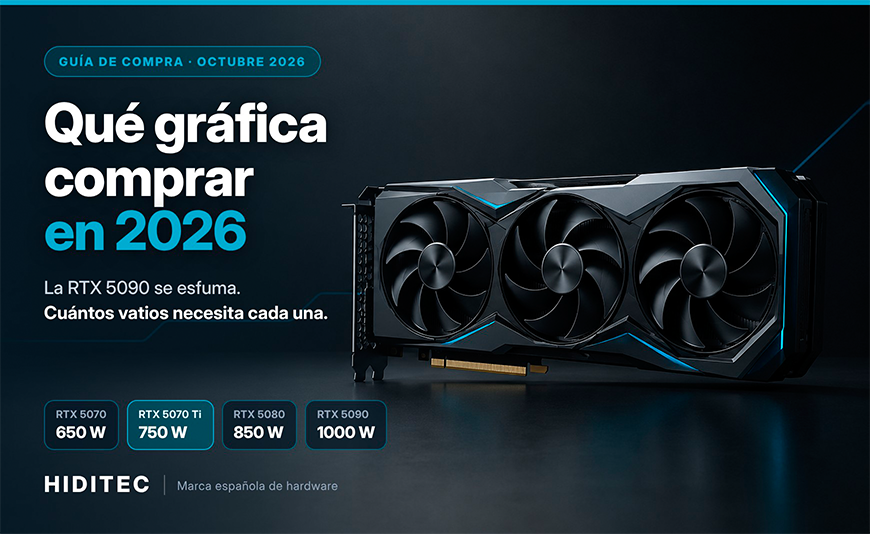
If you are buying a graphics card in 2026, the sensible bet for most people is an RTX 5070 Ti or an RTX 5080 for 1440p and 4K, and an RTX 5060 Ti 16 GB or an RTX 5070 for 1080p and work. The RTX 5090 is barely available and sells for the price of a used car. And watch out: each card needs a different power supply, from 550 W to 1000 W. Here is which one to choose and which PSU each one needs.
Forget chasing the RTX 5090: unless you work with AI or professional rendering, paying several times its launch price makes no sense. For 1440p or 4K gaming and content creation, an RTX 5070 Ti with a 750 W PSU (such as the Hiditec BZ PRO 750 W) is the most balanced combo right now. If you step up to the RTX 5080, step up to 850 W too.
October 2026 will be remembered as the month the most wanted graphics card in PC gaming turned into a unicorn. First came the leaks declaring the RTX 5090 dead, then NVIDIA's "it is not discontinued" with small print, and all the while shops were running out of units. Anyone who wanted one for Christmas is already looking at alternatives.
At Hiditec, a Spanish hardware brand, we get the same question through support every week: "which graphics card should I buy, and will my power supply cope?". So we have written the guide we would have liked to read: what is really going on, which model fits your use (gaming and work) and how many watts each one needs, no hype.
1. What is happening with the RTX 5090 and why it is so hard to find
The RTX 5090 is not officially discontinued, but it is barely being made for the gaming market. On 10 October, several leaks and an alleged factory notice suggested NVIDIA was stopping production to reserve its GB202 chip for RTX Pro professional cards. On 16 October, NVIDIA vice president Jeff Fisher told Taiwanese media that the company will keep shipping it, albeit with limited supply. And on 27 October, VideoCardz reported that NVIDIA was not accepting RTX 5090 orders from its partners, not even backorders.
The underlying reason is the same one that sent RAM prices soaring: AI data centres pay far more for every chip than you or I do. If you want the full context, we explain it in our post on the 2026 RAM crisis.
Explained simply: picture a bakery that makes the best bread in the neighbourhood. One day a hotel chain offers to pay five times more for every loaf. The bakery does not close its shop, but fewer and fewer loaves reach the counter. That is what is happening with the RTX 5090: the "bread" exists, but it goes to the AI hotels.
2. Which graphics card to buy in 2026 depending on how you will use it
The best graphics card for you depends on your resolution and whether you work with it, not on the most expensive model. At current prices, the smart move is to find the point where every euro goes furthest. And there is a surprise: in Spain, the RTX 5080 was available from €1,445 on 24 October, while the RTX 5070 Ti started at €1,290 on 19 October, according to the GPUPrix price tracker. Around €155 apart for a step up in tier that, at other times, cost a lot more.
For work (heavy office use, video editing, 3D or local AI), video memory is king: with 16 GB of VRAM you can handle heavier projects without the software crawling. That is why, at entry level, we recommend the 16 GB RTX 5060 Ti over the 8 GB version if you create content.
Before buying, also check that the card fits in your case and that your motherboard supports it. We explain it step by step in how to know if a graphics card is compatible with your PC, and if you are torn between brands, read our NVIDIA vs AMD 2026 comparison.
Explained simply: buying a graphics card is like choosing a car. To get around town (1080p) you do not need a sports car; for frequent motorway trips (1440p and 4K) a bigger engine helps; and a lorry (the RTX 5090) only makes sense if you haul goods for a living.
3. How many watts each graphics card needs, from the RTX 5060 to the RTX 5090
Every RTX 50 card has an official power draw (TGP) and a minimum recommended PSU for the whole system. The RTX 5090 draws 575 W and calls for a 1000 W PSU; the RTX 5080, 360 W and 850 W; the RTX 5070 Ti, 300 W and 750 W; and the RTX 5070, 250 W and 650 W. At entry level, the RTX 5060 Ti draws 180 W and the RTX 5060, 145 W. On the AMD side, the RX 9070 XT draws around 304 W and calls for 750 W.
| Graphics card | Power draw (TGP) | Recommended PSU | Matching Hiditec PSU |
|---|---|---|---|
| RTX 5060 | 145 W | 550 W | BZ PRO 650 W |
| RTX 5060 Ti | 180 W | 600 W | BZ PRO 650 W |
| RTX 5070 | 250 W | 650 W | BZ PRO 650 W (tight) · BZ PRO 750 W (with headroom) |
| RTX 5070 Ti ★ | 300 W | 750 W | BZ PRO 750 W |
| RX 9070 XT | 304 W | 750 W | BZ PRO 750 W · BZ PRO 850 W if your model uses 3 × 8-pin connectors |
| RTX 5080 | 360 W | 850 W | BZ PRO 850 W · GDX850 V3 |
| RTX 5090 | 575 W | 1000 W | GDX1050 V3 · GDX1200 V3 |
Reference power figures from NVIDIA and AMD, published by MSI, Corsair and Sapphire (see sources below). Factory-overclocked models may need more: always check the spec sheet of your exact card. Got a power-hungry CPU like a Core i9 or Ryzen 9? Add headroom with our PSU wattage table by GPU and CPU or the PSU calculator.
Explained simply: TGP is what the graphics card "eats"; the recommended PSU is what the whole house needs (CPU, motherboard, drives, fans) with the card at full tilt plus a safety cushion. That is why a 300 W card calls for a 750 W PSU, not a 300 W one.
4. Why the power supply is the part you should never skimp on
A graphics card costing €1,000 or more deserves a PSU that can handle its power spikes and feed it through the right cable. Modern graphics cards produce brief power spikes when the load changes suddenly, and ATX 3.1 power supplies are designed to absorb them without shutting down. On top of that, a native 12V-2x6 cable powers the card directly, without multi-cable adapters.
We will be honest: the 12V-2x6 connector is still causing scares in 2026, even with top-tier hardware. Hardware Unboxed measured 175 °C on a cable that melted after testing an RTX 5090, with current flowing through only two of the six pins. Club386 lost an RTX 5090 and a 1000 W PSU to the same problem. No power supply, ours included, makes the connector invulnerable; what does reduce the risk is a careful build.
Explained simply: think of a garden hose. If it is kinked or badly screwed onto the tap, the water pushes on a single point and ends up leaking where it should not. Electricity behaves in a similar way: if the connector is not seated properly, the current concentrates on a few pins and they heat up.
5. Which Hiditec power supply to choose for your graphics card
For most systems with an RTX 5070 Ti or RX 9070 XT, the BZ PRO 750 W is the balanced choice; for an RTX 5080, the BZ PRO 850 W; and for an RTX 5090, a GDX V3 of 1050 W or more. We'll be straight with you: no BZ PRO is suitable for an RTX 5090, because the range tops out at 850 W and that card calls for 1000 W.
For the RTX 5070, RTX 5070 Ti and RX 9070 XT with a mid-range or upper mid-range CPU. Native 12V-2x6 cable, so you skip adapters with the cards that use it.
The 850 W NVIDIA recommends for the RTX 5080, plus headroom for an RTX 5070 Ti with a high-end CPU. Its six PCIe 6+2 connectors cover Radeon cards powered by three 8-pin cables.
If you have managed to get an RTX 5090 or you run long render and AI workloads, this is where you need to be: above the recommended 1000 W, with Gold efficiency and fully modular cabling for a clean build.
Don't do it: fitting an RTX 5090 with an 850 W PSU "because you already had it". It may work for a while, but you have no headroom for power spikes and you are risking a card that now costs several thousand euros. If your card calls for 1000 W, give it 1000 W or more.
Explained simply: Bronze and Gold indicate efficiency, that is, how much energy is lost as heat along the way. A Gold unit wastes less, runs cooler and is usually quieter at full load. For a mid-range gaming PC, a good Bronze is more than enough; for systems that spend long hours flat out, Gold shows on the electricity bill and in the noise.
6. Buy a graphics card now or wait for 2027?
If you need the card now, buy it: there is no sign of a new GeForce generation this year. A report from 25 October claims NVIDIA will end 2026 without launching any new gaming GPU, something that has not happened in almost three decades. At AMD, RDNA 5 is pointing to the second half of 2027.
The only nearby rumour is a 24 GB RTX 5080, which according to leaks would replace the current 16 GB model as the most powerful GeForce. Seasonic's PSU calculator even listed an "RTX 5080 Super" with a 415 W power draw. None of this is confirmed by NVIDIA, but if it happens, that card would need at least a quality 850 W PSU, and the sensible move would be to go higher.
Explained simply: waiting for the next generation is like waiting for house prices to fall: it might happen, but if you need a home now, renting in the meantime costs money too. A power supply, on the other hand, is like good furniture: you take it with you to the next house.
Which graphics card and PSU you need for your PC
| Your PC | Sensible graphics card | Minimum PSU | Recommended Hiditec |
|---|---|---|---|
| Heavy office use and 1080p gaming | RTX 5060 / 5060 Ti | 550–600 W | BZ PRO 650 W |
| 1440p gaming | RTX 5070 / RX 9070 XT | 650–750 W | BZ PRO 750 W |
| High 1440p, 4K and content creation ★ | RTX 5070 Ti | 750 W | BZ PRO 750 W |
| 4K ultra and video editing | RTX 5080 | 850 W | BZ PRO 850 W · GDX850 V3 |
| AI and rendering workstation | RTX 5090 | 1000 W | GDX1050 V3 · GDX1200 V3 |
Frequently asked questions
Has the RTX 5090 been discontinued?
Not officially. On 16 October 2026, NVIDIA said it will keep shipping the RTX 5090, although it acknowledged that supply is limited. Leaks on 10 October suggested its GB202 chip is being reserved for professional cards, and at the end of the month it was reported that NVIDIA is not accepting new orders from its partners. In practice, finding a new one at a reasonable price is almost impossible.
How many watts does an RTX 5080 need?
The RTX 5080 has a reference power draw (TGP) of 360 W and NVIDIA recommends an 850 W power supply for the whole system. If you pair it with a high-end CPU such as a Core i9 or Ryzen 9, or with a factory-overclocked model, go for 1000 W to have headroom for power spikes.
How many watts does an RTX 5070 Ti need?
The RTX 5070 Ti draws 300 W at reference and the official recommendation is a 750 W power supply. With a mid-range or upper mid-range CPU, a quality 750 W unit is plenty. If your CPU draws over 200 W under load or your card is factory overclocked, step up to 850 W.
Is a 650 W power supply enough for an RTX 5070?
Yes: 650 W is exactly what NVIDIA recommends for the RTX 5070, which has a reference power draw of 250 W. It should be a quality unit, ideally ATX 3.1 compatible. If you plan to change your CPU or upgrade your graphics card in the future, a 750 W unit gives you headroom and saves you replacing the PSU in a couple of years.
Which Hiditec power supply do I need for an RTX 5070 Ti or an RX 9070 XT?
The Hiditec BZ PRO 750 W: it meets the 750 W that NVIDIA and AMD recommend for these cards, it is ATX 3.1 and comes with a native 12V-2x6 cable and a 7-year warranty. If your RX 9070 XT uses three 8-pin connectors or your CPU is very demanding, the BZ PRO 850 W, with six PCIe 6+2 connectors, gives you more headroom.
Is it worth waiting for the 24 GB RTX 5080?
Only if you are in no hurry. It is an unconfirmed rumour: October 2026 leaks place it as the most powerful GeForce after the RTX 5090, and a PSU calculator even listed a 415 W power draw. There is no date or price. If you need a graphics card this Christmas, a current RTX 5080 or 5070 Ti is a safe buy.
Do I need a power supply with a native 12V-2x6 connector?
It depends on your graphics card. Many RTX 5060 and 5060 Ti models use the classic 8-pin connector, while high-end cards use the 16-pin 12V-2x6. If your card has one, a power supply with a native 12V-2x6 cable avoids adapters, which are one more weak point. Always push it all the way in and don't bend the cable right at the connector.
Give it the power supply it deserves. ATX 3.1, native 12V-2x6 and up to 7 years of warranty.
See Hiditec power supplies



Leave a Reply Cancel Reply