
 Español
 Português PT

ToroTocho puts 21 fans in a PC with an RTX 5090: does it actually help?
- 17 Nov, 2026
- Home , News
- 0 Comments
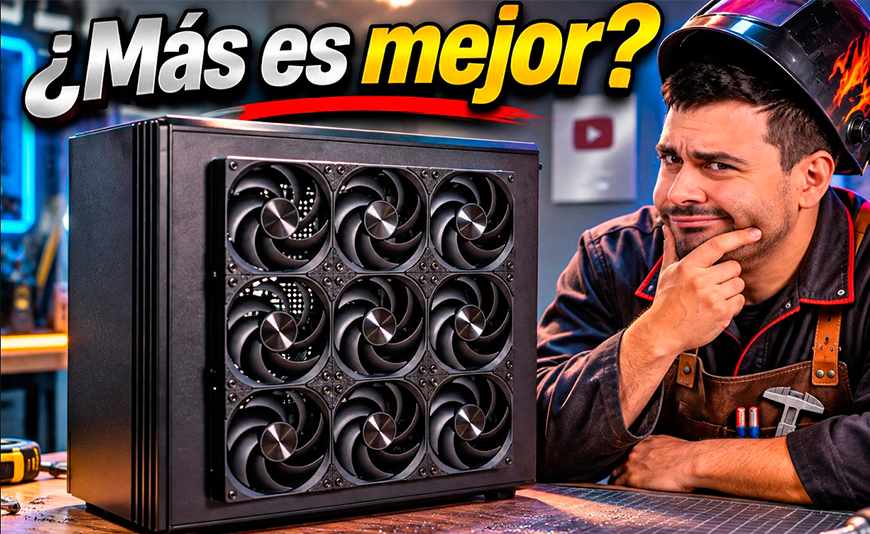
ToroTocho puts 21 fans in a PC case and this happens
how many fans your PC really needs
It depends on how powerful it is: an office PC or a mid-range gaming PC is fine with 3 or 4 case fans, but a high-performance gaming PC, with a graphics card drawing more than 350 W, needs 5, 6 or more, on top of the CPU cooler. And they can't go just anywhere: they have to push fresh air exactly where the heat is. We have the numbers to prove it. ToroTocho built an RTX 5090 and a Ryzen 7 9800X3D, cooled by our DC40 PRO, into our ORIGIM case, filled it with the 12 fans it supports, added 9 more on the outside of the side panel, and the CPU dropped 10 °C while gaming, with the GPU going from 80 to around 74-75 °C.
If you are building a mid-range or high-end PC, start with a case that already comes with fans and lets air in properly, like the Hiditec ORIGIM, which ships with 3 PWM 120 mm fans and takes up to 12. If your build is high-performance, add fans until you reach 5 or 6 and put them where they are needed, not where they look nice. For the CPU, a proper cooler, like the DC40 PRO ToroTocho used. And choose the power supply carefully: the BZ PRO 850 W for an RTX 5080, and the GDX V3 1050 W if you are going for an RTX 5090.
When ToroTocho, a Spanish tech YouTuber, asked us whether he could cut open the side panel of an ORIGIM, we didn't take long to answer: go for it. His idea was simple to explain and hard to pull off. Build the most powerful hardware on the market right now, measure how hot it gets, fill the case with every fan it supports, cut the side panel open with a laser to fit nine more, and measure again. 21 fans in total. All while joking that if the graphics card burnt out, we would be paying for it.
The graphics card survived. What came out of it is one of the clearest tests we have seen on a question that comes up in every forum: do more fans mean a cooler PC? At Hiditec, a Spanish hardware brand, we would rather have someone independent tell you with a thermometer than say it ourselves. Here are his numbers, explained, and what they mean for your PC, whether it is a gaming rig, a workstation or an office computer.
Full video (in Spanish): ToroTocho’s test on YouTube.
1. The test PC: the most powerful hardware available right now
ToroTocho built a top-end machine so the case would have no excuses. An NVIDIA RTX 5090, rated by NVIDIA at 575 W of total graphics power, and an AMD Ryzen 7 9800X3D, with a 120 W TDP according to AMD. All inside a Hiditec ORIGIM, with a DC40 PRO cooler and a BZ PRO 850 W power supply.
| Component | Model | Key figure |
|---|---|---|
| Case | Hiditec ORIGIM | ATX, mesh front with solid wood trim, 3 PWM 120 mm fans included, up to 12 fans |
| Graphics card | NVIDIA GeForce RTX 5090 | 575 W total graphics power (TGP) |
| CPU | AMD Ryzen 7 9800X3D | 8 cores, 120 W TDP |
| CPU cooler | Hiditec DC40 PRO | 6 heatpipes, 2 × 120 mm fans and a temperature display |
| Power supply | Hiditec BZ PRO 850 W | 80 Plus Bronze, ATX 3.1, native 12V-2x6 |
| Case fans (second part) | 21 in total: 12 in the ORIGIM and 9 on the side panel, all Hiditec F10 PWM (3-pack) | Second part only, with the modified side panel |
Why does this combination matter so much? Because between them, the graphics card and the CPU can put around 700 W of heat into the case. If that hot air does not get out quickly, everything else heats up too: the motherboard, the SSDs and the memory.
In plain English: think of the case as a room with a 575 W heater and a 120 W heater switched on. The fans are the windows. It does not matter how big the room is: if the air is not refreshed, it gets hot.
2. ORIGIM out of the box: 80 °C on the GPU and 70 °C on the CPU
With the case exactly as it leaves the factory, after 15 minutes of unrestricted gaming, the RTX 5090 sat at around 80 °C and the 9800X3D at around 70 °C. Those are normal temperatures for these parts. NVIDIA sets the RTX 5090's maximum temperature at 90 °C, and the 9800X3D does not start throttling until 95 °C. On top of that, ToroTocho measured under 40 dB with everything at 100%.
What makes this possible is simple: the ORIGIM has a mesh front with a solid wood accent that lets air in without choking it. The three PWM fans it comes with adjust their speed to the temperature, so day to day they spin slowly and only ramp up when the PC is working hard.
In plain English: a PC at 80% of its maximum temperature is like a road car doing 60 mph on the motorway: it is moving fast, but it is comfortable and well within what it was built to handle all day.
3. With 21 fans: 10 °C less on the CPU
With the ORIGIM fully loaded (the 12 fans it supports) and 9 more on the side panel, blowing fresh air straight onto the graphics card and motherboard, the CPU dropped 10 °C while gaming and the GPU went from around 80 to 74-75 °C. The biggest difference was on the back of the motherboard, which fell from about 50 °C to just over 30 °C.
| Reading (gaming) | Unmodified ORIGIM | With 21 fans | Difference |
|---|---|---|---|
| CPU (9800X3D) | ~70 °C | ~60 °C | −10 °C |
| Graphics card (RTX 5090) | ~80 °C | 74-75 °C | −5 to −6 °C |
| Back of the motherboard | ~50 °C | just over 30 °C | Over −10 °C |
To fit the 9 extra fans on the outside, ToroTocho cut the ORIGIM's side panel with a laser. It is a modding experiment, not a factory configuration. The figures in the middle column are what you will get with a stock case.
Why did it work? Because the fans were not placed at random: they blew straight onto the graphics card, the part that gives off the most heat in a gaming PC. Feed it cool air directly and the air around the CPU and motherboard warms up less. That is why everything drops at once.
The test also gave us an idea we liked. ToroTocho wondered why no manufacturer makes the rear side panel perforated and symmetrical, so you could mount fans there without cutting anything. Duly noted.
In plain English: it is the difference between opening a window at the other end of the house and pointing a desk fan at your face. Both cool you down, but the second one works faster and right where you need it.
4. How many fans your PC needs, depending on what you use it for
The number depends on how much heat your PC produces, and almost all of it comes from the graphics card. An office PC without a dedicated GPU gets by with 1 or 2 fans. A mid-range gaming PC is more than covered with 3 or 4. A high-performance gaming PC is a different story: with graphics cards drawing more than 350 W you need a mesh-front case and 5, 6 or more fans, plus a good CPU cooler.
| Your PC | Approx. heat from GPU + CPU | Recommended case fans | Layout |
|---|---|---|---|
| Office and business | Under 150 W | 1 or 2 | 1 at the front pulling air in, 1 at the back pushing it out |
| 1080p gaming, light editing | 200 to 350 W | 3 | 2 at the front and 1 at the back |
| High-performance 1440p gaming, streaming, video editing | 350 to 500 W | 5 or 6 | 3 at the front, 1 at the back and 1 or 2 on top as exhaust |
| 4K gaming, rendering, local AI (RTX 5080, 5090) | Over 500 W | 6 or more | 3 at the front, 1 at the back, 2 or 3 on top and, if the case allows it, on the side pointing at the GPU |
Intake and exhaust: the rule that matters most
Balance matters more than the number. Ideally a little more air comes in than goes out (positive pressure), so fresh air enters through the filters and dust does not sneak in through the gaps. In practice, run one more intake fan than exhaust, bring air in at the front or bottom and push it out at the back and top, which is where heat rises to.
you game at 1080p or 1440p, your graphics card draws under 300 W and it stays below 80 °C while you play.
your GPU goes past 83-85 °C, your CPU throttles or your fans run flat out for long periods. Add intake fans first, pointing at the graphics card. The ones in the video are the Hiditec F10 PWM, sold in packs of 3.
In plain English: one more fan does not mean one degree less. It is like adding staff behind a bar: the first few make a big difference, but past a certain point they just get in each other's way if there are no more customers to serve.
5. Is an 850 W power supply enough for an RTX 5090?
It can work, but it is not what we recommend. In ToroTocho's test, the BZ PRO 850 W ran the whole system while gaming without a single problem. He said it plainly himself: if he pushed the GPU and CPU to the limit at the same time, 850 W would fall short. And he is right.
NVIDIA lists 1000 W of required system power on the RTX 5090 spec sheet. Its build-preparation guide mentions 850 W as a minimum, but warns that some configurations may need more. Tom's Hardware explains why: the RTX 5090 has very brief power spikes that go beyond its official 575 W. With a 1000 W unit, the graphics card alone already uses 58% of its capacity.
So if you are going for an RTX 5090 or a rendering machine that runs at full load for hours, our honest recommendation is the GDX V3 1050 W: 80 Plus Gold, fully modular and with a native 12V-2x6 cable. The BZ PRO 850 W is the ideal unit one step down, for an RTX 5080 (360 W, with 850 W recommended by NVIDIA) or an RX 9070 XT with plenty of headroom. If you want to run your own numbers, check our wattage table by GPU and CPU.
In plain English: a power supply is like a house's water tank. If everyone turns on a tap at once, the house with a tank that is only just big enough loses pressure. With headroom, nobody notices.
6. The cooler: DC40 PRO, with a display and top-down mounting
For the 9800X3D, ToroTocho used a Hiditec DC40 PRO, an air cooler with 6 heatpipes and two 120 mm fans, rated for CPUs up to 270 W TDP. That is more than double what the 9800X3D needs, which is why the CPU stayed around 70 °C in the stock case.
In the video he highlights two things you will appreciate when building. First, it installs without taking anything apart: you lift off the magnetic top cover and screw it down from above with a long screwdriver. Second, the display, which shows CPU temperature and usage in real time, with an all-black finish.
In plain English: the cooler's display is like the temperature gauge in a car: it does not make anything cooler, but it warns you before there is a problem, without opening any software.
7. A Bronze power supply handled an RTX 5090: imagine what it will do for your PC
The power supply in the video was not a high-end unit. It was a BZ PRO 850 W, with 80 Plus Bronze certification, the one you find on the most affordable power supplies. And it ran an RTX 5090 and a Ryzen 7 9800X3D through unrestricted gaming sessions, with the case full of fans. At the end of the video, the graphics card was still alive.
If a Bronze unit has handled the most demanding PC you can build right now, think about what it will do with yours. With an RTX 5080 it is on home ground. With an RTX 5070 Ti or an RX 9070 XT, the BZ PRO 750 W has power to spare. It is not magic: inside it has a native 12V-2x6 cable, a 105 °C Japanese main capacitor, TÜV certification and a 7-year warranty. We go through it part by part in how to tell if a power supply is good.
The same goes for the cooler. The DC40 PRO kept the 9800X3D at around 70 °C, and ToroTocho fitted it without taking anything apart, screwing it down from above. If it performs like that with one of the most powerful gaming CPUs around, it will have room to spare with yours.
And the case with 21 fans? See the ORIGIM on Amazon.es
An honest note: the fact that it held up while gaming does not mean it is what we recommend for an RTX 5090. For that card, NVIDIA asks for 1000 W and we point you to the GDX V3 1050 W. For everything else, the BZ PRO is the power supply we would put in our own PC.
The Hiditec products in the test
ATX case with a mesh front and solid wood accent. With an RTX 5090 and a 9800X3D, out of the box, it kept the GPU at around 80 °C and the CPU at 70 °C. For gaming PCs and workstations that deserve to look good on the desk.
Air cooler for Intel and AMD, with a display showing CPU temperature and usage. It kept the Ryzen 7 9800X3D at around 70 °C while gaming.
The unit that powered the test PC. Built for graphics cards like the RTX 5080 or RX 9070 XT, with a native 12V-2x6 cable and no adapters. For an RTX 5090, go for the GDX V3 1050 W instead.
Which Hiditec power supply you need for your graphics card
| Your graphics card | Manufacturer-recommended PSU | Hiditec power supply |
|---|---|---|
| RTX 5060 · RTX 5060 Ti | 550 to 600 W | BZ PRO 650 W |
| RTX 5070 Ti · RX 9070 XT | 750 W | BZ PRO 750 W |
| RTX 5080 | 850 W | BZ PRO 850 W or GDX V3 850 W |
| RTX 5090 | 1000 W | GDX V3 1050 W |
Frequently asked questions
How many fans does a gaming PC need?
A mid-range gaming PC is fine with 3 or 4 case fans. A high-performance gaming PC, with a graphics card drawing more than 350 W, needs 5, 6 or more, with exhaust at the top, on top of the CPU cooler. In ToroTocho's test, an RTX 5090 dropped from 80 to 74-75 °C when the Hiditec ORIGIM went up to 21 fans.
Do more fans lower PC temperatures?
Yes, but only if they bring fresh air to where the heat is. In ToroTocho's test, with 21 fans (12 in the ORIGIM and 9 on the side panel, blowing onto the GPU), the CPU dropped 10 °C, the GPU went from 80 to 74-75 °C and the back of the motherboard from about 50 °C to just over 30 °C. Badly placed fans, on the other hand, just add noise and move the same hot air around.
What is a normal RTX 5090 temperature while gaming?
Between 70 and 85 °C is normal while gaming. NVIDIA sets the RTX 5090's maximum temperature at 90 °C. In ToroTocho's test, after 15 minutes of unrestricted gaming, the card sat at around 80 °C inside a stock Hiditec ORIGIM. If it regularly goes above 85 °C, check your case airflow and the dust in your filters.
Is an 850 W power supply enough for an RTX 5090?
It can boot and run games, as it did in ToroTocho's test with a BZ PRO 850 W, but we do not recommend it. NVIDIA asks for 1000 W for the whole system, because the RTX 5090 draws 575 W and has brief spikes above that figure. For an RTX 5090, the right Hiditec power supply is the GDX V3 1050 W.
Should case fans be intake or exhaust?
Both. It is best to have slightly more intake than exhaust: fresh air in at the front or bottom, and out at the back and top, which is where heat rises to. That creates positive pressure, so dust only gets in through the filters. A classic layout is 3 intake fans at the front and 1 exhaust at the back.
Can the Hiditec ORIGIM case handle an RTX 5090?
Yes. ToroTocho built an RTX 5090 with a Ryzen 7 9800X3D into it and, out of the box, the GPU stayed at around 80 °C and the CPU at around 70 °C after 15 minutes of gaming, with under 40 dB measured. The ORIGIM comes with 3 PWM 120 mm fans, takes up to 12 and fits a 360 mm radiator on top.
Is Hiditec a good brand?
Hiditec is a Spanish hardware brand for PCs, with its own technical support team in Spain and a fault-return rate below 0.8%. Its BZ PRO power supplies come with a 7-year warranty and TÜV certification, and in an independent review they held the 12 V rail between 11.96 and 12.03 V at full load. In this ToroTocho test, the ORIGIM, the DC40 PRO and the BZ PRO 850 W ran an RTX 5090.
- ToroTocho puts 21 fans in a PC with an RTX 5090: does it actually help? 17 Nov, 2026

- How to tell if a power supply is good: we open up the Hiditec BZ PRO 30 Oct, 2026
- RTX 5090 sold out: which graphics card to buy in 2026 and how many watts each one needs 28 Oct, 2026
- PC Wattage Table 2026: Which Power Supply Do You Need for Your GPU and CPU? 30 Sep, 2026



- NVIDIA vs. AMD 2026: The Ultimate GPU Comparison for AI, Gaming, and Workstations | Hiditec Global 22 Apr, 2026
- NVIDIA RTX 3060 12GB Returns June 2026: The Ultimate Mid-Range Technical Review |Hiditec Global 04 May, 2026
- Ryzen 7 5800X3D returns in 2026 for $349 — Complete AM4 guide | Hiditec Global 05 Jun, 2026

Leave a Reply Cancel Reply