
 Español
  Português PT
BTF Motherboards in 2026: What Case You Actually Need and Why Most Aren't Compatible With Every Standard
- 02 Sep, 2026
- Home , News
- 0 Comments
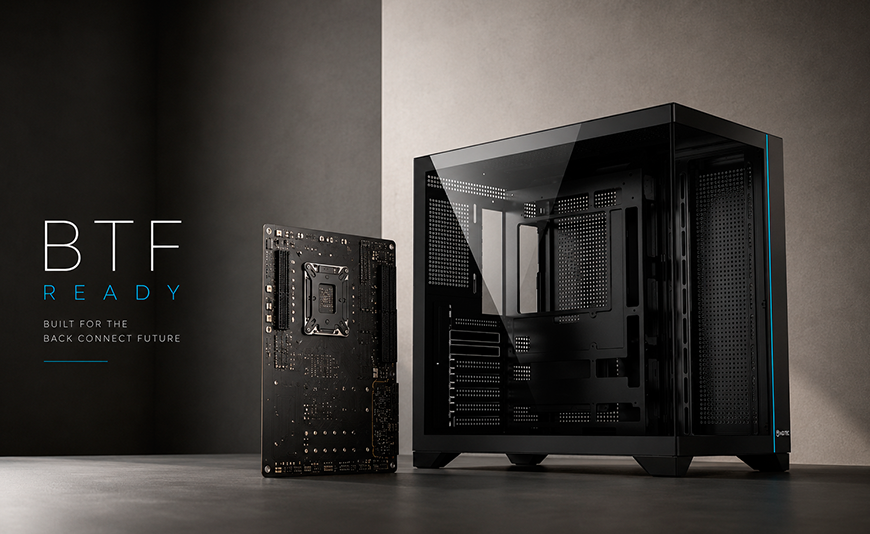
BTF Motherboards in 2026: What Case You Actually Need
and Why Most Cases Aren't Compatible With Every Standard
ASUS BTF, MSI Project Zero, and GIGABYTE AORUS Stealth motherboards have gone mainstream in 2026 — and they all share one thing: every connector moves to the back of the PCB. The problem is that their rear-connector systems aren't interchangeable across brands, and the vast majority of cases on the market only support one or two of these standards. Buy the wrong case without checking, and your board simply won't work as intended.
The Essentials: BTF, Project Zero, and AORUS Stealth in 2026
Three separate standards, none of them universal. ASUS BTF, MSI Project Zero, and GIGABYTE AORUS Stealth all relocate connectors to the back of the board, but each uses a different layout and a different mounting system. Your case has to be built for the exact standard your board uses — or for all three.
The most expensive mistake of 2026. Buying a "BTF-compatible" case without verifying whether it also supports Project Zero or AORUS Stealth is the most common error in hardware forums this year. Many cases advertise BTF support but only cover the ASUS standard.
Compatibility matters more than case price. A cheap case that doesn't work with your board isn't a bargain — it's money wasted. In 2026, the selection criteria for cases has changed. BTF compatibility is the first filter. Airflow is second. Price is third.
The fix: a case that supports all three standards. Cases designed to work natively with BTF, Project Zero, and AORUS Stealth do exist. Choosing one eliminates compatibility risk regardless of which board you have or end up buying.
Not long ago, picking a PC case was fairly straightforward: form factor (ATX, microATX, ITX), GPU length, cooler height, and price. In 2026 there's a step before all of that — one most buyers are skipping: verifying which BTF standards a case actually supports before purchasing.
This guide explains exactly how the three standards differ, why they're not interchangeable, and what to look for before clicking buy. Whether you've already chosen your board or you're still deciding, what you read in the next few minutes could save you a return shipment and a week of waiting.
1. What BTF Is — and Why It's Gone Mainstream in 2026
BTF stands for Back-to-Front — a motherboard design that moves every power, storage, and peripheral connector to the rear of the PCB. The result is a board whose front face, the side visible through your case's tempered glass panel, is completely free of cables. No SATA bundle, no 24-pin ATX, no CPU EPS, no USB headers cluttering the view.
The technology itself isn't new: MSI introduced Project Zero in 2023, ASUS developed their version as BTF, and GIGABYTE called theirs AORUS Stealth. What is new in 2026 is the scale. What used to be a high-end enthusiast option has expanded into mid-range lineups from all three brands, with AM5 and LGA1851 socket support at accessible price points. That's what's turned BTF compatibility into a real purchasing criterion for a much wider audience.
For the non-technical reader: think of the difference between a car dashboard with every wire visibly bundled behind the gauges versus one where all wiring runs cleanly behind the panel. Performance is identical, but the result looks completely different. With BTF boards, the case has to be designed to route those cables behind the board in exactly the right way.
| Feature | Conventional Motherboard | BTF / Project Zero / AORUS Stealth Board |
|---|---|---|
| Connector placement | Front of the PCB | Rear of the PCB |
| Cable management visibility | Always visible | Completely hidden |
| Case compatibility | Universal | Requires a case built for the exact standard |
| Build complexity | High (manual cable management) | Low (cable routing pre-designed by the case) |
| Final look | Depends on the builder | Clean build, guaranteed |
2. The Three Standards Sharing the Market in 2026: BTF, Project Zero, and AORUS Stealth
Here's the real problem that most guides don't spell out clearly enough: BTF, Project Zero, and AORUS Stealth are not three names for the same thing. They're three independent implementations of the same concept, developed separately by ASUS, MSI, and GIGABYTE. They share the philosophy of moving connectors to the back of the PCB — but execute it with different mechanical solutions that are not interchangeable.
The easy analogy: think of phone chargers before USB-C. Micro-USB, Lightning, and USB-C all charged your phone, but none of the cables worked across brands. BTF works the same way — the case needs the cable pass-throughs and openings in the exact positions required by your specific board's standard.
The Three BTF Standards of 2026: What Sets Them Apart
ASUS BTF (Back-to-Front)
Uses a proprietary BTF connector on the back of the board for the 24-pin ATX and CPU EPS. The case needs side panel openings in ASUS-specific positions — and on many models, an integrated connector built into the chassis itself. Compatible with ROG, TUF Gaming, and PRIME BTF Edition lineups.
MSI Project Zero
Relocates connectors through PCB cutouts at MSI-specific positions. Not every model requires a proprietary case connector, but the rear panel still needs openings in the right places. Compatible with MEG, MAG, and MPG Project Zero lineups.
GIGABYTE AORUS Stealth
GIGABYTE's implementation uses rear connectors at their own brand-specific positions. Compatible with AORUS Master Stealth, Stealth X, and AORUS Elite Stealth models. Shares the BTF philosophy — not the connector positions — with ASUS or MSI.
| Standard | Brand | Proprietary Connector | Cross-Standard Compatible |
|---|---|---|---|
| BTF | ASUS | Yes — proprietary BTF connector | No |
| Project Zero | MSI | Partial, varies by model | No |
| AORUS Stealth | GIGABYTE | Yes — proprietary AORUS connectors | No |
3. The Real Problem: Why Most Cases Don't Cover All Three Standards
When case manufacturers started adding BTF support to their lineups, most adapted to a single brand's standard — typically ASUS BTF, the first to gain widespread traction — or two at best. Supporting all three simultaneously requires a rear panel and cable routing design that accounts for the connector positions of ASUS, MSI, and GIGABYTE at the same time, which adds engineering complexity and cost to the chassis.
In practice, a buyer who picks up a "BTF-compatible" case without reading the fine print may find that it only works correctly with ASUS boards — leaving them stuck if their board is an MSI Project Zero or a GIGABYTE AORUS Stealth. Or worse: they install the board, route the cables behind the rear panel thinking everything is fine, and only later discover that the openings aren't in the right positions and the cables either don't reach or won't sit flush.
The easy analogy: imagine buying a travel adapter labeled "compatible with European outlets" that turns out to only work with Germany's two-pin round sockets — not Italy's three-pin or the UK's flat-pin plugs. They're all "European," but they're not interchangeable. BTF cases work exactly the same way.
| Case Type | ASUS BTF | MSI Project Zero | GIGABYTE AORUS Stealth |
|---|---|---|---|
| Standard case, no BTF support | No | No | No |
| "BTF-compatible" case (1 standard) | Yes (usually) | Varies | Varies |
| Case with 2-standard support | Yes | Yes | No |
| Hiditec H3 PRO | Yes | Yes | Yes |
4. Hiditec H3 PRO: The Case That Supports All Three BTF Standards
The Hiditec H3 PRO's competitive advantage in 2026 is specific: native compatibility with ASUS BTF, MSI Project Zero, and GIGABYTE AORUS Stealth — all three rear-connector standards currently active in the market. That means you can choose whichever motherboard fits your needs and budget, regardless of brand, without having to swap cases or cross-check compatibility tables afterward.
Beyond BTF compatibility, the H3 PRO is built around front-intake, rear-and-top-exhaust airflow, integrated velcro cable routing channels, support for CPU coolers up to 165 mm tall and GPUs up to 370 mm long, with ATX and MicroATX motherboard support and a standard ATX PSU bay.
Hiditec H3 PRO: Key Specs
BTF Compatibility
Supports ASUS BTF, MSI Project Zero, and GIGABYTE AORUS Stealth natively. Also fully compatible with conventional non-BTF motherboards.
Form Factor & Clearances
ATX and MicroATX boards. CPU cooler up to 165 mm. GPU up to 370 mm. Standard ATX PSU.
Airflow & Cable Management
Front intake, rear and top exhaust. Integrated velcro cable routing channels. Rear compartment with adequate depth for BTF cabling.
5. What Else You Need for a Complete BTF Build
A compatible case is the most important requirement, but it's not the only one. A complete BTF build — with absolutely no cables visible on the front side — requires every component to work within that workflow. If even one doesn't, the final result won't either.
| Component | BTF Requirement | Consequence If Not Met |
|---|---|---|
| Case | Compatible with your board's exact standard | Build is impossible or cables won't stay hidden |
| Motherboard | BTF Edition, Project Zero, or AORUS Stealth | Cables route to the front face (standard board behavior) |
| Power Supply | Standard ATX, modular or semi-modular preferred | Unused cables crowd the rear compartment already occupied by BTF cabling |
| CPU Cooler | Socket-compatible (AM5 / LGA1851) and within case height | Cooler may not fit or can block rear cable pass-throughs |
| GPU | Within case's max GPU length (H3 PRO: 370 mm) | GPU won't fit or blocks drive bays |
If you haven't chosen a CPU cooler for your BTF build yet, check our complete cooling guide for the Ryzen 7 9800X3D — the same height and TDP criteria apply to any high-end CPU in 2026.
BTF Case Compatibility: Frequently Asked Questions
The most common questions answered with actual data
Will my BTF board fit in any ATX case?
Physically, yes. Functionally, no. A BTF, Project Zero, or AORUS Stealth board will seat in any standard ATX case, but the rear connectors only work correctly in a case designed for that specific standard. In a conventional case, cables would still have to route to the front of the board — defeating the entire point of the BTF design.
Are ASUS BTF, MSI Project Zero, and GIGABYTE AORUS Stealth interchangeable?
No. All three move connectors to the rear of the PCB, but they use different connector positions and different mechanical solutions. A case built specifically for ASUS BTF doesn't necessarily work with an MSI Project Zero board, and vice versa.
Do I need a special PSU for a BTF build?
No BTF-specific PSU needed, but modular or semi-modular is strongly recommended. A fully modular PSU lets you leave disconnected any cables you're not using, which keeps the rear compartment clear — a space that's already occupied by the board's rear connectors. A non-modular PSU with all cables permanently attached can make that tight space significantly harder to work in.
Is it worth going BTF in 2026, or should I wait for the standards to unify?
2026 is a perfectly good time to make the switch. Mid-range BTF boards are genuinely affordable, the case selection is solid, and all three major brands have settled into their respective standards. Industry-wide unification isn't expected anytime soon — waiting for it could mean waiting several more years. The smarter move is to choose a case that supports all three standards so you're not locked into a single board brand.
Does a BTF case have worse airflow than a conventional one?
Generally, airflow improves. With no cables crossing the front of the board, nothing is blocking the flow from your front intake fans toward the GPU and CPU. The rear compartment does take up space with cabling, but that space sits outside the main airflow path. A well-designed BTF case delivers equal or better airflow than a comparable conventional case.
Are BTF motherboards noticeably more expensive than conventional ones?
The price gap has narrowed considerably in 2026, with BTF options now available across all price tiers from ASUS, MSI, and GIGABYTE. In many cases, the premium over the equivalent conventional model is under $25–30. For a mid-to-high-end build where you're already spending on case, CPU, and GPU, that difference is marginal next to what you get back in build experience and final aesthetics.
Sources:
- Esgamingpc: BTF and Project Stealth adoption in 2026 as a mainstream case-selection criterion
- Componentesordenador: community warnings about legacy cases and modern BTF board compatibility
- Hiditec: H3 PRO technical specifications and compatibility with ASUS BTF, MSI Project Zero, and GIGABYTE AORUS Stealth
- Amazon: Hiditec H3 PRO — ATX/MicroATX case compatible with all three BTF standards



Leave a Reply Cancel Reply