
 Español
  Português PT
How to Know if a Graphics Card is Compatible with Your PC: Complete 2026 Guide with RTX 5090, RX 7900 XTX and Mid-Tower Case Real Examples
- 16 Sep, 2026
- Home , News
- 0 Comments
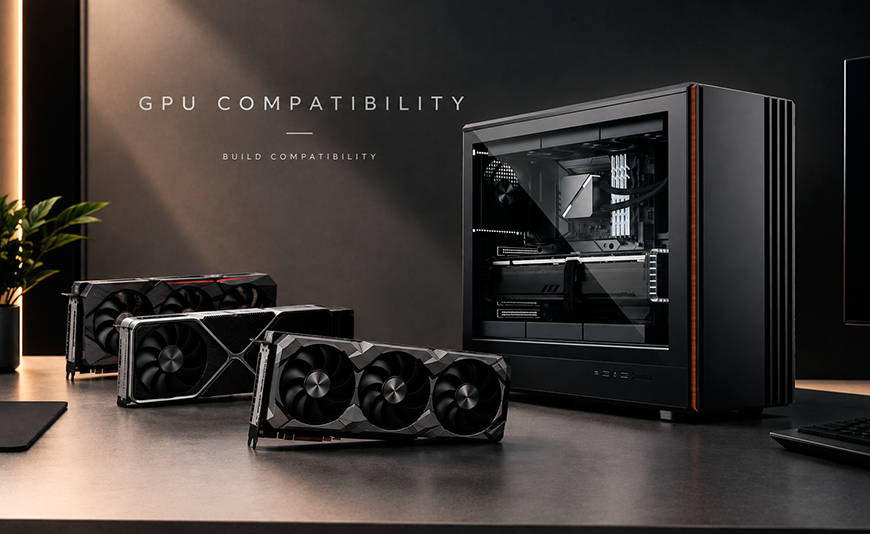
How to know which graphics card is compatible with your PC:
complete guide to dimensions, slots, power supply and airflow with real GPU examples
Before buying an RTX 5090, an RX 9070 XT or any next-generation graphics card, you need to know if it physically fits in your case, if your PSU can power it, how many slots it occupies, and whether the internal airflow will be sufficient to maintain safe temperatures. This guide explains everything with real data, using the Hiditec ORIGIM as a mid-tower case reference and the largest custom models on the market as use cases.
The essentials before buying a new graphics card
First: the maximum supported GPU length. Every case has a physical limit in millimetres for the graphics card length. The Hiditec ORIGIM supports cards up to 420 mm, making it one of the mid-towers with the most clearance on the market. The MSI RTX 5090 SUPRIM SOC measures 359 mm: it fits with 61 mm to spare.
Second: PCIe slots. Modern high-end GPUs occupy between 2 and 4 slots. The ASUS ROG and MSI SUPRIM custom RTX 4090 and 5090 cards take up 3.5 or 4 slots. The ORIGIM has 7 available PCIe slots: enough for any GPU on the market.
Third: the power supply. An RTX 5090 has a 575W TDP and requires at minimum a 1000W PSU. An RX 9070 XT at 304W works perfectly with a 750W PSU like the Hiditec BZ PRO 750W.
Fourth: the maximum CPU cooler height. The ORIGIM supports coolers up to 174 mm, covering all mid-range and high-end air coolers on the market, including the Hiditec DC40 PRO and equivalents from Noctua or be quiet!.
Compatibility between a graphics card and a PC case is more complex than it appears. It's not just a matter of "does it fit or not?". There are five dimensions to check before buying any GPU, and each one can be the deciding factor in whether the build works correctly, whether the system overheats, or whether the card simply doesn't fit in the case.
This guide explains each of those factors using the real specifications of the Hiditec ORIGIM and the largest, most in-demand GPU models on the market as concrete examples: RTX 5090 in its SUPRIM SOC, SUPRIM LIQUID and ASUS ROG Strix LC versions, as well as the RX 7900 XTX and its reference and custom TOP variants.
1. GPU length: the first compatibility filter for your case
The length of the graphics card is the first figure to cross-reference with the case specifications. It is measured from the PCIe rear bracket to the end of the heatsink or PCB, in millimetres. The Hiditec ORIGIM supports cards up to 420 mm, a limit that no current market GPU exceeds in its air-cooled version, including the largest custom RTX 5090 models.
Important: on models with integrated liquid cooling (LC), the water block that sits inside the case is usually shorter than the air-cooled version, but requires space for an external radiator. The MSI RTX 5090 SUPRIM LIQUID SOC has the GPU block at 280 mm (well within the 420 mm limit), but its 360 mm radiator needs to be mounted in the top of the case, where the ORIGIM natively supports exactly that format.
| Graphics card | Length | Slots | Fits in ORIGIM (420mm)? | Notes |
|---|---|---|---|---|
| MSI RTX 5090 SUPRIM SOC | 359 mm | 3.5 slots | ✅ Yes — 61mm clearance | Triple fan, massive heatsink |
| MSI RTX 5090 SUPRIM LIQUID SOC | 280 mm (block) | 2.5 slots | ✅ Yes — 360mm top radiator | Radiator uses ORIGIM's top 360mm mount |
| ASUS ROG Astral RTX 5090 OC | ~360 mm | 4 slots | ✅ Yes — 60mm clearance | 4 fans, check side clearance |
| ASUS ROG Strix LC RTX 5090 | ~280 mm (block) | 2.5 slots | ✅ Yes — 360mm top radiator | Same logic as SUPRIM LIQUID |
| ASUS ROG Strix RTX 4090 OC | ~336–358 mm | 3.5 slots | ✅ Yes | Previous gen GPU, widely compatible |
| AMD RX 7900 XTX (reference) | 287 mm | 2.5 slots | ✅ Yes — 133mm clearance | Excellent compatibility |
| Sapphire Nitro+ RX 7900 XTX | ~320–340 mm | 2.5 slots | ✅ Yes | Custom models with triple heatsink |
| AMD RX 9070 XT | ~270–300 mm | 2.5 slots | ✅ Yes — ample clearance | Efficient next-gen GPU |
| RTX 5090 Founders Edition | ~340 mm | 2 slots | ✅ Yes | Compact design for its power class |
2. PCIe slots: how much space your GPU actually takes up in the case
The number of PCIe slots a graphics card occupies determines how much vertical space it needs in the case. One slot equals 20.32 mm in height. A 4-slot GPU like the ASUS ROG Astral RTX 5090 takes up 81.28 mm of space across the rear brackets. The Hiditec ORIGIM has 7 PCIe brackets available, meaning it can accommodate any GPU on the current market regardless of thickness.
Why slot count matters in practice: 3.5 and 4-slot GPUs can physically block the lower PCIe slots on your motherboard, preventing installation of sound cards, capture cards or network cards. If your build includes more than one PCIe card, make sure the slots you need aren't blocked by the main GPU's heatsink.
PCIe slots of the most popular models in 2026
2 slots
RTX 5090 Founders Edition · RTX 5070 reference · RX 9060 XT reference. Compact designs that leave maximum space in the case.
2.5 slots
RX 7900 XTX reference · RX 9070 XT · MSI RTX 5090 SUPRIM LIQUID. The de facto standard for mid-range cards and some high-end ones.
3 – 3.5 slots
MSI RTX 5090 SUPRIM SOC · ASUS TUF RTX 5090 · Sapphire Nitro+ RX 7900 XTX. High-end cards with high-performance heatsinks.
4 slots
ASUS ROG Astral RTX 5090 OC · some ROG Matrix models. Cases with 7 PCIe brackets like the ORIGIM have no problem.
3. Power supply and PCIe connector: what each GPU needs and which connector to use
The type of power connector and the PSU wattage are the second most important factor after dimensions. Next-generation GPUs have introduced the 12V-2x6 connector (successor to the 12VHPWR), capable of supplying up to 600 W through a single 16-pin connector. For air-cooled versions of the RTX 5090, NVIDIA recommends at least 1,000 W PSUs. For LC versions with lower thermal TDP at the block, actual power draw on the PCB is similar but power spikes can be sharper, so the PSU recommendation is the same.
| GPU | Official TDP | Connector | Minimum recommended PSU | Recommended Hiditec PSU |
|---|---|---|---|---|
| RTX 5090 (all models) | 575 W | 12V-2x6 (16-pin) | 1000 W | BZ PRO 850W + third-party 1000W PSU |
| RTX 5080 | 360 W | 12V-2x6 (16-pin) | 850 W | BZ PRO 850W |
| RTX 5070 Ti / RX 9070 XT | 300 / 304 W | 2×8-pin or 12V-2x6 | 750 W | BZ PRO 750W |
| RX 7900 XTX / X | 355 / 320 W | 2×8-pin | 800 W | BZ PRO 850W |
| RX 9060 XT / RTX 5070 | 160 / 250 W | 2×8-pin | 650 W | BZ PRO 650W |
4. Airflow and cooling: why the case matters as much as the GPU
A GPU that doesn't receive enough cool airflow inside the case can reach temperatures of 90–95°C under load, which triggers thermal throttling: the card reduces its clock speeds to protect itself, and you lose exactly the performance you paid for. A case with good airflow can make a difference of 10–15°C in GPU temperature compared to a case with poor airflow.
The Hiditec ORIGIM features a micro-perforated mesh front panel with a solid wood accent, support for up to 12 fans in 6 different positions and magnetic dust filters on top. It comes with 3 × 120mm F10 PWM fans pre-installed: 2 at the bottom and 1 at the rear. For a build with an RTX 5090 or RX 7900 XTX, the optimal configuration is to add at least 3 front fans and 3 top fans to create a positive pressure airflow tunnel.
Recommended fan configuration in the Hiditec ORIGIM by build type
Mid-range build (RX 9060 XT / RTX 5070)
The 3 included fans are sufficient. Optionally add 3 front fans to improve cool air intake. Expected GPU temperatures: 65–75°C during gaming.
High-end build (RX 7900 XTX / RTX 5080)
Recommended: 3 front intake + 3 top exhaust + 1 rear (included). Total: 7 fans. Expected GPU temperatures: 70–80°C during sustained gaming.
Enthusiast build (RTX 5090 / MSI SUPRIM SOC)
Maximum configuration: 3 front + 3 top + 3 bottom + 1 rear. The ORIGIM supports up to 12 fans. Expected GPU temperatures: 72–82°C under extreme load.
5. The Hiditec ORIGIM: full specifications for evaluating any GPU compatibility
Before deciding whether a case is compatible with your build, you need all its specifications on the table. Here are those of the Hiditec ORIGIM with the data that matters for GPU and next-generation component compatibility:
| Specification | Value | What it means for your build |
|---|---|---|
| Max GPU length | 420 mm | Compatible with RTX 5090 SUPRIM SOC (359mm), ROG Astral (360mm) and any GPU on the market |
| Max CPU cooler height | 174 mm | Compatible with Hiditec DC40 PRO, Noctua NH-D15, be quiet! Dark Rock Pro 4 and equivalents |
| Overall dimensions | 496 × 220 × 459 mm | Standard mid-tower, compatible with regular desk setups |
| Motherboard support | ATX / Micro-ATX / ITX | Compatible with all platforms: AM5, LGA 1851, LGA 1700, AM4 |
| PCIe slots available | 7 slots | Supports GPUs up to 4 slots without restriction |
| Top radiator support | 360 / 240 / 120 mm | Compatible with RTX 5090 SUPRIM LIQUID SOC and ASUS ROG Strix LC (360mm radiator) |
| Rear radiator support | 120 mm | Compact AIOs or additional exhaust |
| Pre-installed fans | 3 × F10 PWM 120mm | 2 at bottom + 1 rear. Sufficient for mid-range builds |
| Total fans supported | Up to 12 | Maximum capacity for enthusiast builds with RTX 5090 or RX 7900 XTX |
| Storage | 3 × 2.5" SSD + 1 × 3.5" HDD | Sufficient for gaming setups with multiple NVMe SSDs on the board |
| Front panel I/O | 1× USB 3.2 Type-C + 2× USB 3.0 + Audio | Modern connectivity; check your motherboard has an internal Type-C header |
| Side panel | Screwless tempered glass | Quick interior access and build visibility |
6. Specific compatibility: RTX 5090, RTX 4090, RX 7900 XTX and RX 9070 XT in the Hiditec ORIGIM
MSI GeForce RTX 5090 32G SUPRIM SOC in the Hiditec ORIGIM
The MSI RTX 5090 SUPRIM SOC measures 359 mm and occupies 3.5 slots. It fits in the ORIGIM with 61 mm of length clearance, and its 3.5 slots fall well within the 7 available. The only critical point is the PSU: its 575 W TDP requires a minimum 1000 W PSU with a native 12V-2x6 cable to avoid the risks of using an adapter. The ORIGIM's airflow is sufficient for this model provided at least 6 fans are configured in a positive-pressure setup.
MSI GeForce RTX 5090 32G SUPRIM LIQUID SOC in the Hiditec ORIGIM
The Liquid version of the SUPRIM has the GPU block at just 280 mm, fitting with 140 mm of clearance. Its 360 mm radiator needs to be installed in the top case mount, for which the ORIGIM has native support (360/240/120 mm). When the radiator is installed on top, the top fans act as a heat exhaust for the radiator: in this case, make sure the front fans are set to intake and properly oriented to compensate.
ASUS ROG Astral / Strix LC GeForce RTX 5090 in the Hiditec ORIGIM
The ROG Astral RTX 5090 OC physically occupies 4 slots with its four-fan Axial-Tech system. On a standard ATX board with 7 PCIe slots like those supported by the ORIGIM, this GPU fits without issue. The 4 slots block the top 4 from above, leaving the bottom 3 available. For the ROG Strix LC version with AIO, the same logic applies as with the SUPRIM LIQUID: short block + 360mm radiator in the top mount.
AMD RX 7900 XTX / RX 7900 X (reference and TOP models) in the Hiditec ORIGIM
AMD's reference RX 7900 XTX measures 287 mm, fitting with 133 mm of clearance in the ORIGIM. Custom models from PowerColor, Sapphire Nitro+ and XFX MERC with larger heatsinks reach 320–340 mm, still well within the 420 mm limit. The connector is the standard 2×8-pin, with no adapter complications. With an 850 W PSU, the system has sufficient headroom for a build featuring a Ryzen 9 9950X3D with the XTX. The RX 7900 X model has a 35 W lower TDP, making 750–800 W enough when combined with a mid-range CPU.
7. Full checklist before buying your GPU: the 8 points to verify
1. Maximum GPU length of the case vs. actual GPU length
Find the "GPU length" or "max VGA length" spec in the case's technical sheet. Compare it with the length of the card you want to install. Hiditec ORIGIM: 420 mm.
2. Number of available PCIe slots in the case
Count the case slots and subtract those occupied by your GPU. ORIGIM: 7 slots. A 4-slot GPU leaves 3 free.
3. PSU wattage and connector type
Verify your PSU has enough wattage and the correct connector type (native 12V-2x6 for RTX 5000, 2×8-pin for AMD RDNA 3/4).
4. Maximum CPU cooler height
If the CPU cooler is too tall, it can interfere with the side panel. ORIGIM: 174 mm, covering all mid-range and high-end market coolers.
5. Radiator support if using liquid cooling
For CPU AIOs or LC GPUs, check the supported radiator formats. ORIGIM: top 360/240/120mm + rear 120mm.
6. Motherboard form factor
Verify the case is compatible with your motherboard (ATX, Micro-ATX, ITX, E-ATX). ORIGIM: ATX, Micro-ATX and ITX.
7. USB Type-C header on the motherboard for the front panel
The ORIGIM has USB 3.2 Type-C on the front panel. To use it, your motherboard needs the 20-pin internal USB 3.2 Gen 2x2 header. Most B650 and Z890 boards include it; budget boards may not.
8. Cable management: space behind the motherboard tray
The ORIGIM has 21 mm of cable routing space behind the tray, sufficient for most cables. With a modular PSU, the visual result and airflow improve considerably.
Frequently asked questions about case and GPU compatibility
The 20 most common questions before choosing or assembling your PC case
How do I know if a graphics card is compatible with my PC?
You need to check four things: (1) that the GPU length in millimetres is less than the maximum length supported by your case; (2) that the number of slots the GPU occupies does not exceed those available in the case; (3) that your PSU has enough wattage to power it; (4) that your motherboard has a PCIe x16 slot. If all four points are correct, the GPU is compatible.
Does an RTX 5090 fit in a mid-tower?
It depends on the case. The MSI RTX 5090 SUPRIM SOC measures 359 mm in its air-cooled version. Any mid-tower supporting 360 mm or more GPU length can accommodate it without issue. The Hiditec ORIGIM supports 420 mm, so the RTX 5090 SUPRIM SOC fits with 61 mm to spare.
Does the MSI SUPRIM LIQUID fit in the Hiditec ORIGIM?
Yes. The SUPRIM LIQUID version has the GPU block at 280 mm (well within the ORIGIM's 420 mm), and its 360 mm radiator installs in the top mount, for which the ORIGIM has native support. It's one of the best combinations for RTX 5090 builds that want to keep noise levels low.
What is the maximum GPU length supported by the Hiditec ORIGIM?
The Hiditec ORIGIM supports graphics cards up to 420 mm in length. No current market GPU exceeds that limit in its air-cooled version.
Does the ASUS ROG Strix LC RTX 5090 fit in the Hiditec ORIGIM?
Yes. The ROG Strix LC water block measures approximately 280 mm, fitting with ample clearance. Its 360 mm radiator mounts on the top of the case, where the ORIGIM has native support for that format.
Does the RX 7900 XTX fit in any mid-tower?
AMD's reference version measures 287 mm, making it compatible with practically any mid-tower on the market. Custom models like the Sapphire Nitro+ or PowerColor Red Devil can reach 320–340 mm, but still fit in the vast majority of cases supporting 340 mm or more.
What CPU cooler can I use in the Hiditec ORIGIM?
The ORIGIM supports coolers up to 174 mm in height, covering all high-end air coolers on the market: Noctua NH-D15 (165mm), be quiet! Dark Rock Pro 5 (168mm), Hiditec DC40 PRO and equivalents. Only the most extreme enthusiast coolers (Noctua NH-D15S in some configurations) may require additional checking.
What AIO radiator size can I install in the Hiditec ORIGIM?
The ORIGIM supports 360, 240 and 120 mm radiators at the top, and 120 mm at the rear. You can install a 360 mm CPU AIO at the top and use the rear position for an additional 120 mm exhaust fan.
Can I install a CPU AIO radiator and an LC GPU at the same time in the ORIGIM?
It depends on the available space. If you install the CPU AIO at the front (360 mm) and the LC GPU at the top (360 mm), you're using all the large radiator spaces in the case simultaneously. This is possible in the ORIGIM, but requires careful planning of tube and fan cable management.
How many fans can I install in the Hiditec ORIGIM?
Up to 12 fans: 3 front (or 2 × 140mm), 2 at the bottom, 3 top (or 2 × 140mm), 3 bottom, and 1 rear. It comes with 3 × F10 PWM 120mm fans pre-installed (2 at bottom + 1 rear).
Which motherboards are compatible with the Hiditec ORIGIM?
The ORIGIM is compatible with ATX (305×244mm), Micro-ATX (244×244mm) and ITX (170×170mm) motherboards. This covers Intel LGA 1700, LGA 1851 and AMD AM4, AM5 platforms. It is not compatible with E-ATX or HPTX larger-format boards.
Do I need a vertical GPU mount or anti-sag bracket for the ORIGIM?
With 3.5–4 slot GPUs like the ROG Astral RTX 5090 or MSI SUPRIM SOC, an anti-sag bracket is highly recommended, as the weight of these cards can bend the motherboard's PCIe slot over time. The ORIGIM does not include an anti-sag bracket as standard, but universal compatible brackets are available.
How many drives and SSDs can I install in the Hiditec ORIGIM?
The ORIGIM has bays for 3 × 2.5" drives (SATA SSDs) and 1 × 3.5" drive (HDD). NVMe M.2 SSDs mount directly on the motherboard and don't use any case bays.
Does the Hiditec ORIGIM case have a tempered glass panel?
Yes. The left side panel is screwless tempered glass. The right panel is SECC steel. The tempered glass lets you see the interior of the build and components with ARGB or RGB lighting if installed.
Can I use a 1200W PSU in the Hiditec ORIGIM for an RTX 5090?
Yes, no problem. The ORIGIM accommodates standard ATX format PSUs regardless of wattage. PSUs up to 180mm depth are the most common and fit perfectly. Check the depth of your PSU if it exceeds that size.
What does it mean that a GPU occupies 3.5 slots?
One PCIe slot equals 20.32 mm of height across the rear case brackets. A 3.5-slot GPU occupies 71.12 mm vertically on the rear panel. In practice, a 3.5-slot GPU fits perfectly in any case with 7 available slots, but blocks the first 3 or 4, leaving less room for additional cards.
Is airflow better in a case with a mesh front or a solid panel?
A mesh front panel (micro-perforated grille) like the Hiditec ORIGIM's allows up to 30–40% more airflow than a solid front panel, reducing GPU and CPU temperatures by 5–10°C under sustained load. For builds with high-end GPUs like the RTX 5090 or RX 7900 XTX, a mesh front panel is highly recommended.
What is the difference between a Mid-Tower, Full-Tower and Mini-Tower case?
A mini-tower typically only supports Micro-ATX or ITX boards and GPUs up to 300–330 mm. A mid-tower like the ORIGIM supports ATX boards, long GPUs (up to 420 mm) and large radiators, making it the most versatile option for high-performance gaming. A full-tower supports E-ATX boards and allows multi-radiator configurations, but takes up much more desk space.
Does the USB Type-C on the ORIGIM's front panel need a special connector on the motherboard?
Yes. The USB 3.2 Type-C on the ORIGIM's front panel requires a USB 3.2 Gen 2×2 internal header (20 pins) on the motherboard. Most mid-range and high-end B650, X870, Z790 and Z890 boards include it. Budget entry-level boards may not; in that case, the Type-C port won't work although the USB 3.0 ports on the panel will.
What is the best mid-tower PC case for an RTX 5090 or RX 7900 XTX build in 2026?
For a high-end GPU build you need a case with at least 360–380 mm GPU length, a mesh front for airflow, 360 mm radiator support and 7 PCIe slots. The Hiditec ORIGIM meets all those requirements with 420 mm maximum length, mesh front with a wood accent, 360 mm top support, 12 fan positions and 7 PCIe slots, all for €60.90. It is one of the most complete options in its price range on the market in 2026.
8. Recommended complete builds with the Hiditec ORIGIM in 2026
For a concrete reference of which components work well together inside the ORIGIM, here are three verified complete builds: a mid-range one for 1080p–1440p gaming, a high-end one for 1440p–4K gaming, and an enthusiast one for those who want the best on the market in 2026.
BUILD 1
1080p–1440p Gaming · Smart budget
| Case | Hiditec ORIGIM — €60.90 | Mesh front, 420mm GPU, 3 fans included |
| CPU | AMD Ryzen 5 7600X | 105W TDP, 6 cores, AM5 socket |
| Motherboard | MSI MAG B650 TOMAHAWK WIFI (ATX) | AM5, DDR5, USB 3.2 Type-C header |
| RAM | 32 GB DDR5-6000 (2×16 GB) | XMP/EXPO compatible |
| GPU | AMD RX 9060 XT 16GB (~320mm) | 160W TBP, 2×8-pin, fits with 100mm clearance |
| CPU Cooler | Hiditec DC20 PRO | Single tower, 120mm PWM, AM5 compatible |
| PSU | Hiditec BZ PRO 650W | ~280W gaming, 43% load = peak efficiency |
| Storage | 1 TB NVMe PCIe 4.0 M.2 | Mounts on motherboard, no case bays used |
Expected gaming temperatures: CPU ~55–65°C · GPU ~68–75°C. The 3 fans included with the ORIGIM are sufficient for this build without needing to add more.
BUILD 2 ★ RECOMMENDED




Leave a Reply Cancel Reply