
 Español
  Português PT
How to tell if a power supply is good: we open up the Hiditec BZ PRO
- 30 Oct, 2026
- Home , News
- 0 Comments
How to tell if a power supply is good
we open up the Hiditec BZ PRO
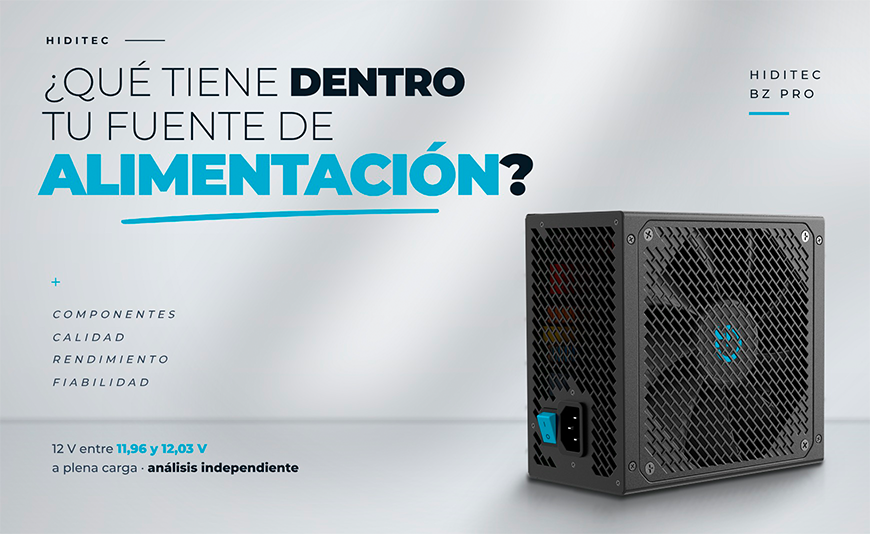
A power supply is good when it keeps the 12 V rail steady with the PC flat out, has real protection against short circuits and voltage surges, and is built with components that can take the heat for years. The wattage sticker tells you none of that. That's why we sent our BZ PRO 650 W to an independent reviewer to open it up and measure it: it delivered 626 W, 96% of its capacity, with the 12 V rail locked between 11.96 and 12.03 V.
If your gaming or work PC has a current graphics card, the BZ PRO is the power supply we recommend: 650 W for an RTX 5060 or 5060 Ti, 750 W for an RTX 5070 Ti or RX 9070 XT, and 850 W for an RTX 5080. An office PC without a dedicated graphics card needs much less. And if you are building with an RTX 5090, no BZ PRO will do: you need a 1050 W GDX V3.
Let's be blunt: the power supply is the component people look at least and the one that causes the most grief. Nobody shows off their PSU in a photo of their setup. The graphics card gets chosen with a magnifying glass, the CPU gets compared for weeks, and the power supply gets "whatever's left in the budget". Until one day the PC shuts down mid-game, or halfway through a three-hour render, and then it suddenly matters.
At Hiditec, a Spanish hardware brand, we know we don't have the name recognition of the big brands. So we did the only thing that really builds trust: we sent a BZ PRO 650 W to an independent reviewer and let them open it, take it apart piece by piece and measure it in a real PC at full load. Here is what they found, explained so you don't need to be an engineer, and how to use the same approach to judge any power supply, ours or not.
1. Why your power supply matters more than ever in 2026
Because it feeds every other part, and in 2026 every other part costs more than ever. A 32 GB DDR5 kit that cost €70 a year ago now sells for €499.99 on Amazon Spain, according to El Chapuzas Informático (15 October 2026). An RTX 5070 Ti starts at €1,290 in Spain, according to the GPUPrix price tracker (19 October 2026). We explain why in our post on the 2026 RAM crisis.
A bad power supply can do more than switch your PC off. If it delivers unstable voltage or a protection fails, it is the motherboard, the graphics card or the memory that pays. And in an office the problem multiplies: a dead PC is a dead workstation, and with machines running 8 to 10 hours a day, efficiency and standby draw show up on the electricity bill.
Explained simply: a power supply is like the tyres on a car. Nobody shows them off, but they are the only thing touching the road. You can have the best engine in the world: if the tyres fail, the engine doesn't matter.
2. Five signs your current power supply is asking to be replaced
If your PC reboots under load, your power supply came "free" with the case, or you don't even know which model it is, you have every reason to replace it. These are the signs we see again and again in the questions that reach our support team:
Explained simply: a borderline power supply is like a house with low water pressure. Turn on one tap and it's fine. Turn on the shower and the dishwasher at the same time and the water cuts out. Your PC works the same way: fine on the desktop, and when gaming, with everything pulling at once, it shuts down.
3. What is inside a good power supply: what the reviewer found in the BZ PRO
You can spot a good power supply from the inside: a full input filter, active PFC, a good main capacitor, independent regulation of each voltage and a circuit that monitors the protections. This is what turned up when the cover came off the BZ PRO 650 W:
| Part | What it does | What the BZ PRO has |
|---|---|---|
| Input filter | Cleans electrical noise from the mains and stops voltage surges before they get in | Full filter, with a varistor (MOV) and fuse working together |
| Active PFC | Makes better use of the power coming from the wall socket | Yes, with a measured power factor of up to 0.93 |
| Main capacitor | Stores energy for power spikes. If it is poor, it is one of the first things to age | Japanese, 105 °C rated |
| 12 V output | Powers the graphics card and the CPU, the hungriest parts | Synchronous rectification on a single 12 V rail |
| 5 V and 3.3 V outputs | Power drives, USB and part of the motherboard | Independent DC-DC converters |
| Output capacitors | Smooth the current reaching your components | 105 °C electrolytic capacitors and polymer capacitors |
| Supervisor circuit | The watchdog that cuts the power if something goes wrong | Over-current, over-voltage, under-voltage and short-circuit protection (OCP, OVP, UVP and SCP) |
| Cables | Carry power to every part | Sleeved and flexible, two separate CPU cables and a native 12V-2x6 cable for new graphics cards |
What the reviewer highlighted most was the DC-DC design. It is the layout used in mid-range and high-end power supplies: each voltage is regulated separately, so when the graphics card pulls hard on the 12 V rail, the 5 V and 3.3 V rails don't even notice. In their measurements, the 5 V rail stayed between 4.97 and 4.99 V and the 3.3 V rail between 3.24 and 3.27 V at every load. They also liked that the two CPU cables are separate rather than coming off the same lead, something you don't always see at this price.
Explained simply: a power supply with DC-DC is like a house with a circuit breaker for every room. If you turn on the oven and the hob at the same time in the kitchen, the living room light doesn't flicker. Each room has its own control.
4. The tests: how the BZ PRO 650 W behaved with the PC flat out
It kept the 12 V rail between 11.96 and 12.03 V from 82 W up to 626 W of load, with average efficiency of 85.3% and no problems in the thermal test. The reviewer installed it in a real system (Ryzen 7 5800X3D and a 350 W RTX 3070 Ti), in a room at 26-28 °C, and measured the voltages with a multimeter directly at the connectors, not with software readings.
| Test | BZ PRO 650 W result | What it means |
|---|---|---|
| 12 V voltage (from 82 to 626 W) | Between 11.96 and 12.03 V | The ATX standard allows 11.40 to 12.60 V |
| 12 V / 5 V / 3.3 V regulation | 0.58% / 0.40% / 0.91% | How much each voltage moves going from light to heavy load. The lower, the better |
| Average efficiency | 85.3% (peak 86.5%) | Of every 100 W taken from the wall, about 85 reach your PC |
| Maximum load measured | 626 W at 83.5% efficiency | Close to its rated capacity, and voltages stayed within range |
| Standby draw | 0.2 W | What it uses with the PC switched off but plugged in |
| EU ecodesign regulation (Regulation 617/2013) | Compliant | Power requirement for computers sold in the EU |
| ALPM low-power mode | Compatible | Works with the power-saving states of modern systems |
| Thermal test | Passed without issues | Handled sustained load with no cut-outs or shutdowns |
Their conclusion was clear: good electrical performance, good cables and a good topology, and a power supply that, in their words, "can be recommended without a doubt considering the excellent pricing". The only drawback they mentioned is that the filtering capacitors on the secondary side wouldn't be their first choice, although they consider them fine to use. Noted.
And to be just as transparent about the method: we supplied the unit, and the reviewer explains that their measuring equipment is basic (a multimeter and a wattmeter in a real PC), not a lab with an electronic load like those some specialist outlets use. That is why we give you the figures as they are, without rounding them in our favour.
With the graphics card at 350 W, the 12 V rail dropped to an average of 11.86 V using a single PCIe cable with two daisy-chained connectors. With two separate cables, one per connector, it stayed at 11.98 V. If your graphics card draws a lot of power and has two or three 8-pin connectors, use a separate cable for each one. It costs nothing and your card will thank you.
Explained simply: voltage regulation is like cruise control in a car. Set it to 120 and it doesn't matter whether you're on the flat or climbing a mountain pass: the needle doesn't move. A power supply with good regulation does the same with the 12 V rail, whether you're gaming or reading your email.
5. BZ PRO, BZ V2 or GDX V3: which Hiditec power supply to choose
The BZ PRO is for PCs with current graphics cards, the BZ V2 for office machines and the GDX V3 for the high end. Compared with the BZ V2, the BZ PRO adds the native 12V-2x6 cable for new-generation graphics cards, meets ATX 3.1 and PCIe 5.1, and accepts any input voltage from 100 to 240 V, while the BZ V2 is designed for 230 V mains like those in Spain and the UK.
| Range | Efficiency | Native 12V-2x6 cable | Cabling | Who it is for |
|---|---|---|---|---|
| BZ V2 | 80 PLUS Bronze | No | Fixed | Office, business and PCs without a new-generation graphics card |
| BZ PRO ★ | 80 PLUS Bronze | Yes | Fixed | Gaming and work with RTX 50 or Radeon RX 9000, up to the RTX 5080 |
| GDX V3 | 80 PLUS Gold | Yes | Fully modular | High end, RTX 5090 and systems that spend hours at full load |
The unit that was opened up and measured in this analysis. For systems with an RTX 5060, RTX 5060 Ti or RX 9060 XT, and for workstations with a dedicated graphics card.
Same platform, more headroom. For the RTX 5070, RTX 5070 Ti and RX 9070 XT with a mid-range or upper mid-range CPU. It is the one we recommend most for a current gaming PC.
The 850 W NVIDIA recommends for the RTX 5080, or extra headroom for an RTX 5070 Ti with a high-end CPU. Its six PCIe 6+2 connectors let you run one cable per connector even on three-connector graphics cards.
Don't do it: pairing an RTX 5090 with a BZ PRO. The range tops out at 850 W and that card needs a 1000 W power supply. For that build, go for the GDX1050 V3. If you're not sure how many watts your system needs, check our guide on which graphics card to buy in 2026 and how many watts each one needs or the PSU calculator.
Explained simply: choosing a power supply range is like choosing a van. For local deliveries (office) a small one will do. For weekend house moves (gaming), a medium one with a good engine. And if you move pianos for a living (RTX 5090), you need a lorry, however good the medium van is.
6. Why trust a small brand like Hiditec
Because we are not asking you to take our word for it: we show you what is inside and give you seven years to check. We are not the best-known brand on the market and we won't pretend to be. What we can do is what many big brands don't: let an outsider open our power supply and publish what they found, including the part that wasn't perfect.
Explained simply: it is like the local greengrocer who lets you taste a grape before you buy the bunch. They don't have the biggest sign on the street, but they don't need it: if the fruit is good, you come back.
Which Hiditec power supply your PC needs
| Your PC | Graphics card | Recommended Hiditec PSU |
|---|---|---|
| Office and business | Integrated or entry-level | BZ V2 550 W |
| 1080p gaming and light editing | RTX 5060 / 5060 Ti · RX 9060 XT | BZ PRO 650 W |
| Gaming 1440p | RTX 5070 · RX 9070 | BZ PRO 650 W (tight) · BZ PRO 750 W (with headroom) |
| High 1440p, 4K and content creation ★ | RTX 5070 Ti · RX 9070 XT | BZ PRO 750 W |
| 4K ultra and video editing | RTX 5080 | BZ PRO 850 W · GDX850 V3 |
| AI and rendering workstation | RTX 5090 | GDX1050 V3 |
Frequently asked questions
Are Hiditec power supplies any good?
Judge for yourself with the data. In an independent analysis, the Hiditec BZ PRO 650 W held the 12 V rail between 11.96 and 12.03 V up to 626 W of load, with average efficiency of 85.3% and no issues in the thermal test. Inside it has active PFC, a Japanese 105 °C main capacitor and DC-DC regulation, plus a 7-year warranty with support based in Spain.
What does an independent reviewer think of the Hiditec BZ PRO?
That it can be recommended without a doubt for the price. They highlighted its good electrical performance, the quality of the cables and the DC-DC design. The only area for improvement they pointed out is that the filtering capacitors on the secondary side wouldn't be their first choice, although they consider them fine. The unit tested was the 650 W model, supplied by Hiditec.
How do I know if my power supply is failing?
The most common signs are reboots or shutdowns while gaming or rendering that never happen on the desktop, electrical buzzing, a fan that scrapes or speeds up for no reason, and a smell of hot components. If the power supply also came bundled with the case or has no 80 PLUS certification, it is worth replacing before the problem reaches your graphics card or motherboard.
What is the difference between the Hiditec BZ PRO and the BZ V2?
The BZ PRO adds the native 12V-2x6 cable used by new-generation graphics cards, meets ATX 3.1 and PCIe 5.1, and accepts input voltages from 100 to 240 V, while the BZ V2 is designed for 230 V mains. Both are 80 PLUS Bronze with a 7-year warranty. For current gaming builds, the BZ PRO; for office machines, the BZ V2 is more than enough.
Is an 80 PLUS Bronze power supply enough for gaming?
Yes, for most gaming PCs. The certificate measures efficiency, not quality or safety: a well-built Bronze unit is a better buy than a Gold unit with poor components. The BZ PRO 650 W measured 85.3% average efficiency. Gold pays off mainly in systems that spend many hours at full load, where you notice it on the electricity bill and in the noise.
What does it mean when a power supply has DC-DC converters?
It means the 5 V and 3.3 V rails are generated and regulated separately from the 12 V rail. So when the graphics card pulls hard on 12 V, the other voltages don't move. It is the usual design in mid-range and high-end power supplies. In the BZ PRO 650 W, the 5 V rail stayed between 4.97 and 4.99 V at every load measured.
Is it better to use one PCIe cable per graphics card connector?
Yes, if your graphics card draws a lot of power. In the BZ PRO tests with a 350 W graphics card, a single cable with two daisy-chained connectors left the 12 V rail at an average of 11.86 V, while two separate cables kept it at 11.98 V. Both values are within the standard, but one cable per connector spreads the load better.
BZ PRO: ATX 3.1, native 12V-2x6, TÜV certification and a 7-year warranty.
See Hiditec power supplies



Leave a Reply Cancel Reply